
Graphical User Interface
Nanoconda provides a GUI that can be used for trading and account administration.
User Roles
There are several roles that can be assigned to your users and grant different privilages.
Viewer
Has access to viewing the account information.
- GUI Windows
- Account Summary Window
- Trade Log Window
- Live Orders Window
- Trading Window
- Algo Window
- Boa Spreader Window
- GUI Functionality
- Flatten Account
- Cancel Orders
- Modify Orders
- Disable / Enable Trading for the account
- Modify Risk Limits
- View multiple accounts
Trader
Has all viewer permissions + ability to submit Trades and control algos.
Note
Each trader screen must have market data entitlements for displaying real-time data
- GUI Windows
- Account Summary Window
- Trade Log Window
- Live Orders Window
- Trading Window
- Algo Window
- Boa Spreader Window
- GUI Functionality
- Flatten Account
- Cancel Orders
- Modify Orders
- Disable / Enable Trading for the account
- Modify Risk Limits
- View multiple accounts
Administrator
Has all viewer permissions + ability to oversee and control account activity.
- GUI Windows
- Account Summary Window
- Trade Log Window
- Live Orders Window
- Trading Window
- Algo Window
- Boa Spreader Window
- GUI Functionality
- Flatten Account
- Cancel Orders
- Modify Orders
- Disable / Enable Trading for the account
- Modify Risk Limits
- View multiple accounts
Clearer
Reserved for clearing firms to view account activity for their clients and manage account risk limits and trading access.
- GUI Windows
- Account Summary Window
- Trade Log Window
- Live Orders Window
- Trading Window
- Algo Window
- Boa Spreader Window
- GUI Functionality
- Flatten Account
- Cancel Orders
- Modify Orders
- Disable / Enable Trading for the account
- Modify Risk Limits
- View multiple accounts
Screenshots
Trading Window
Roles Access:
- Viewer
- Trader
- Administrator
- Clearer
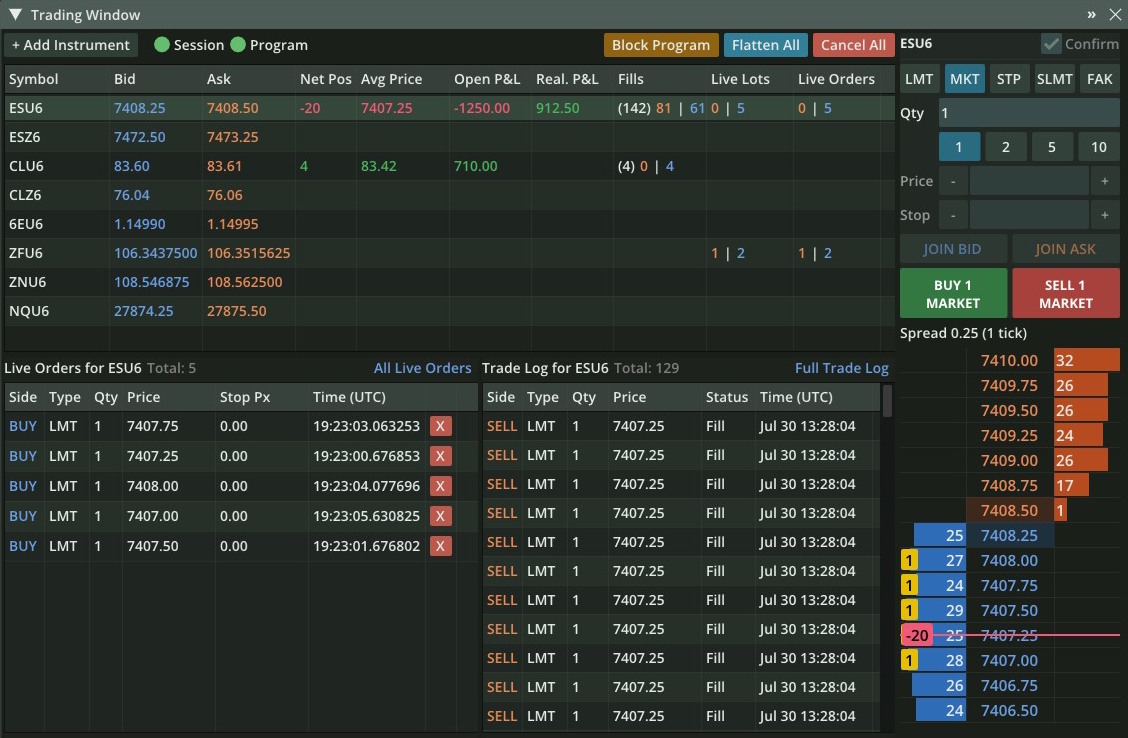
DOM Window (Depth of market)
Roles Access:
- Viewer
- Trader
- Administrator
- Clearer

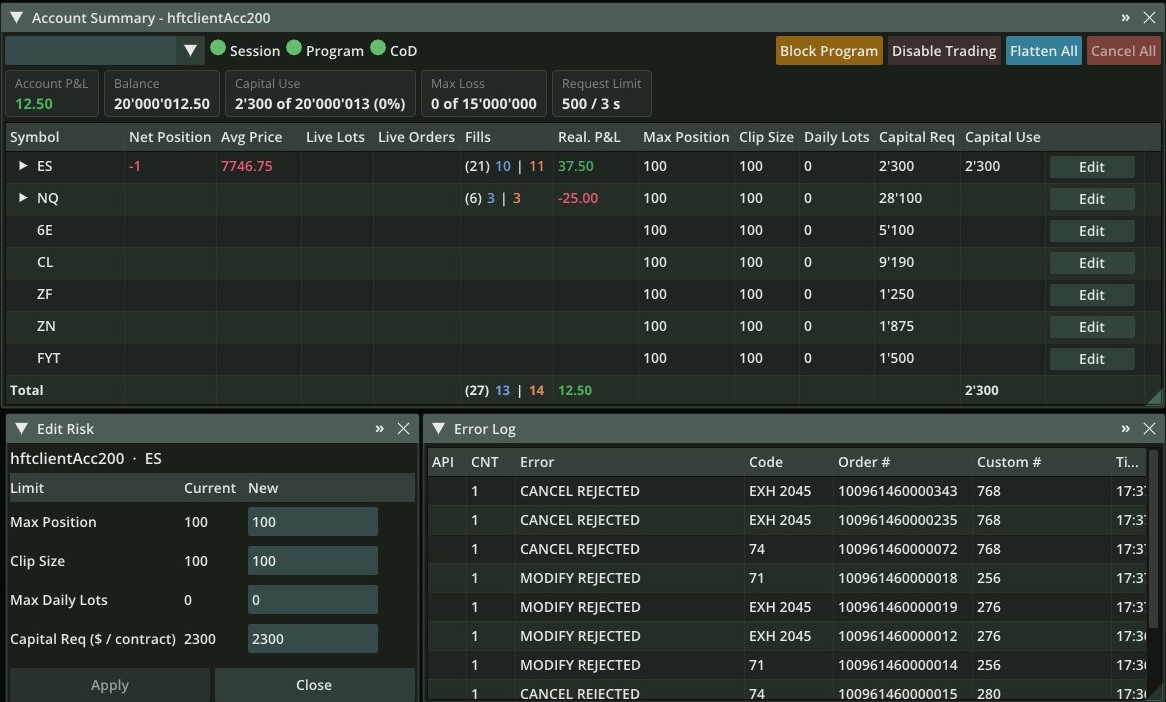
Account Summary
Roles Access:
- Viewer
- Trader
- Administrator
- Clearer

Trade Log
Roles Access:
- Viewer
- Trader
- Administrator
- Clearer
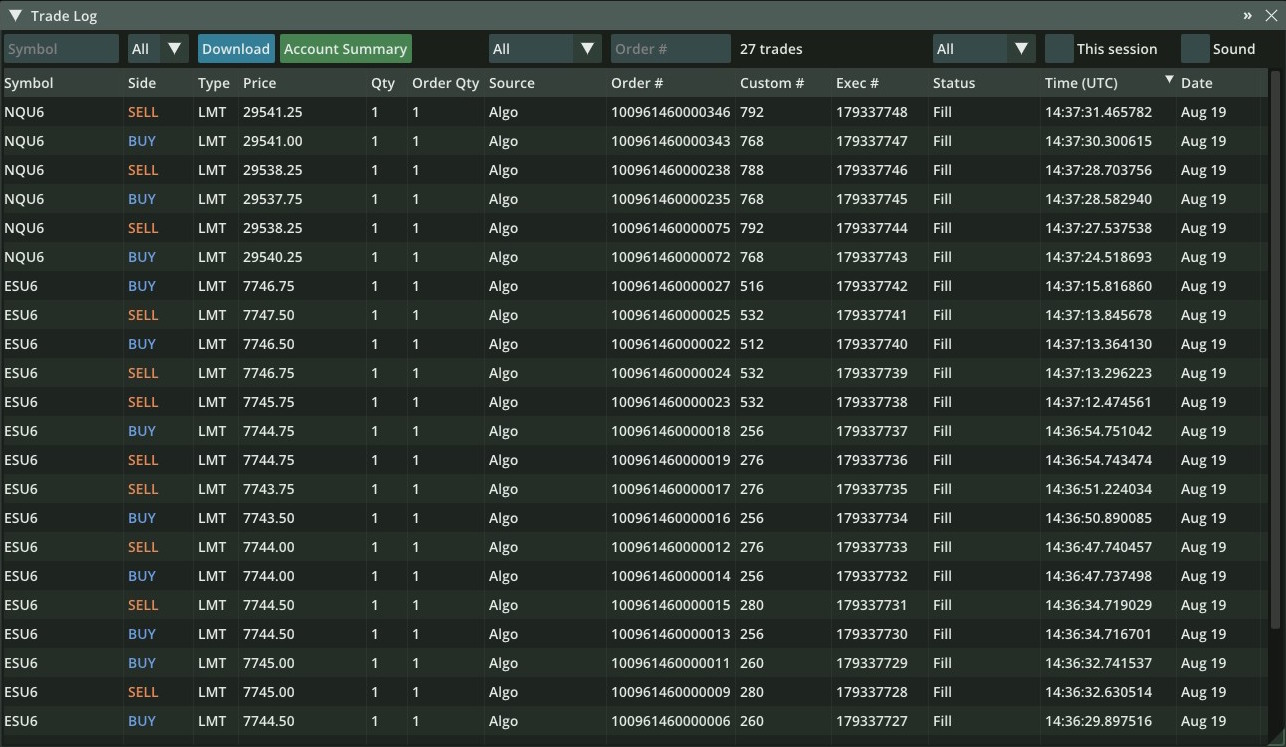
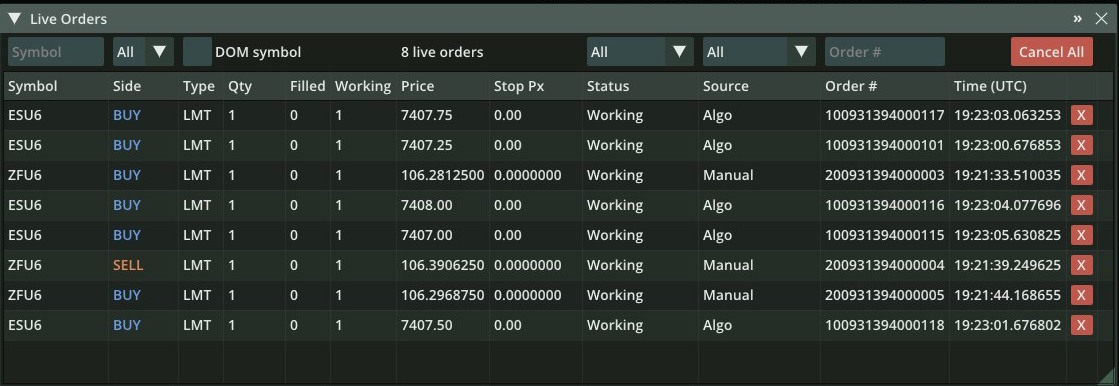
Live Orders
Roles Access:
- Viewer
- Trader
- Administrator
- Clearer
Clearing Controls
Roles Access:
- Viewer
- Trader
- Administrator
- Clearer
Algo Window
Roles Access:
- Viewer
- Trader
- Administrator
- Clearer
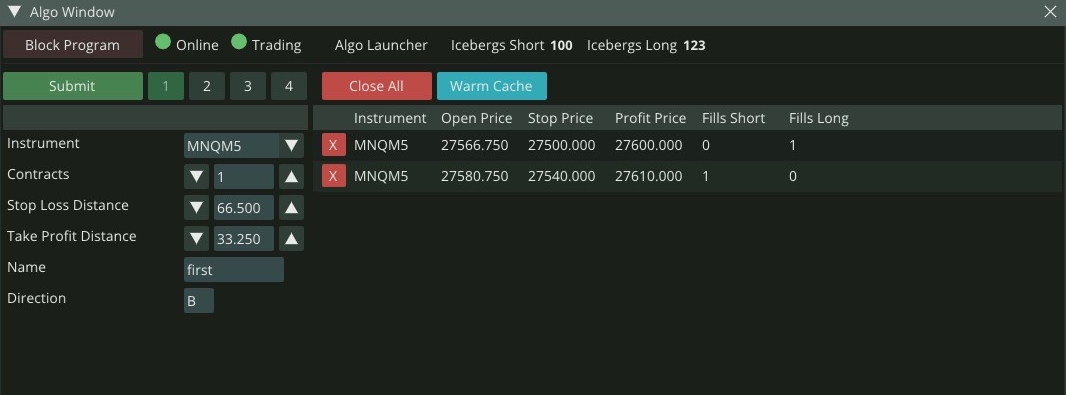
The Algo Window controls programs built on the Algo Control API, such as the Algo Framework (market maker, spreader, smart orders).
Boa Spreader
Roles Access:
- Viewer
- Trader
- Administrator
- Clearer
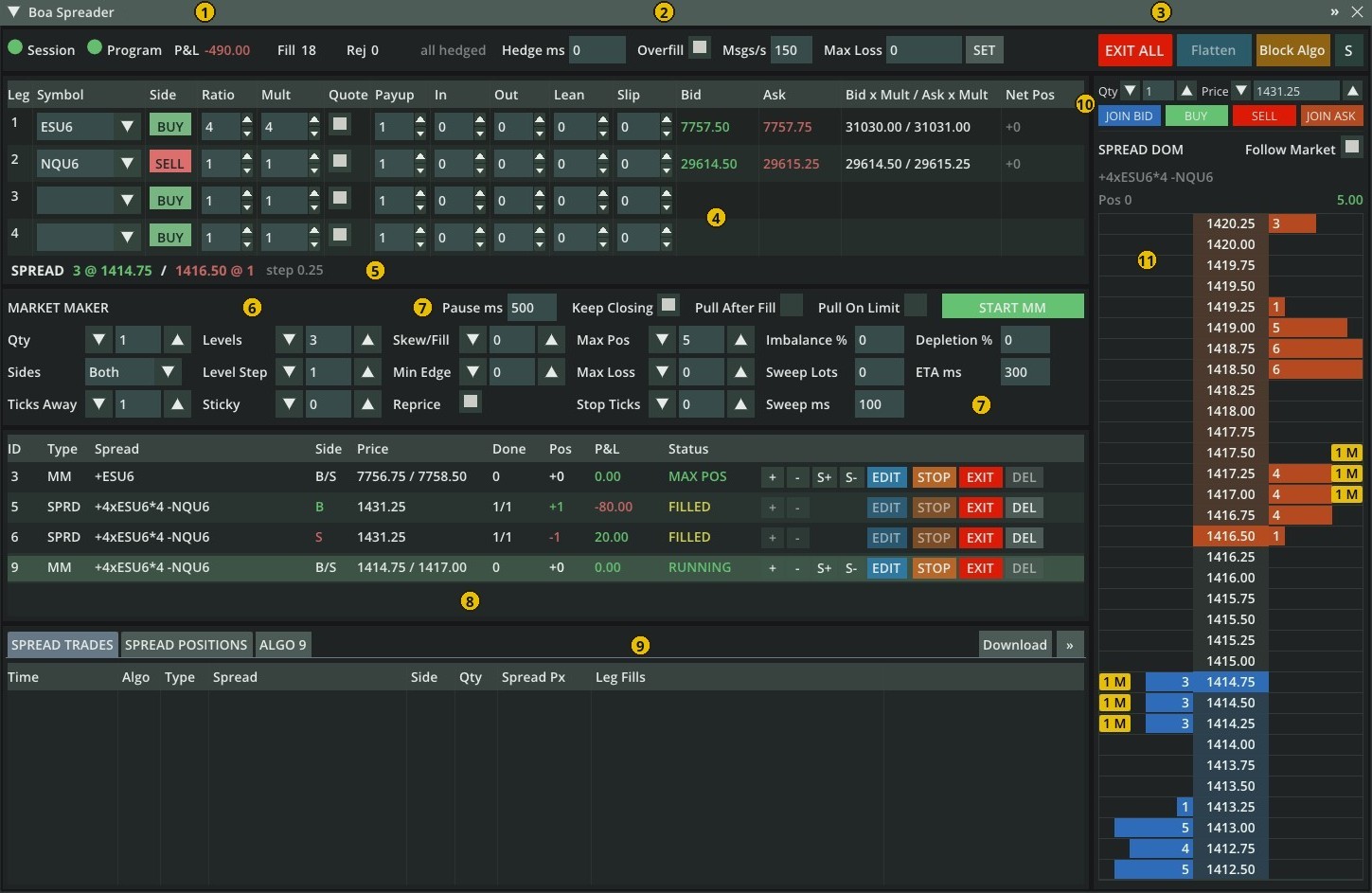
Spread trading and spread market making with a spread DOM. Requires the Boa Spreader application; see Boa Spreader.
Configuring Users and Roles
Users are defined in the <Credentials> node of the session XML. The same logins are used
for the GUI, Remote API, Sierra Chart and FIX. On the managed production environment, send
user changes to Nanoconda support.
- Hash the password:
nanoconda-cli -a hashstring -i yourPassword - Add one
<User>per person or program:
<Credentials>
   <User login="desk-trader"  passwordhash="PASSWORD_HASH" role="trader"/>
   <User login="desk-admin"   passwordhash="PASSWORD_HASH" role="admin"/>
   <User login="fcm-risk"     passwordhash="PASSWORD_HASH" role="clearer"/>
   <User login="drop-copy"    passwordhash="PASSWORD_HASH" role="viewer"/>
</Credentials>
- Restart the session. Users are only read at startup.
| Attribute | Required | Description |
|---|---|---|
login |
Yes | Username, up to 23 characters. Longer values stop startup. |
passwordhash |
Yes | Output of hashstring, never the plain-text password. |
role |
Yes | viewer, trader, admin or clearer. Lowercase only. |
operator-id |
No | CME operator for this user's orders. Up to 23 characters. |
party-id |
No | CME party ID for this user's orders. Enables the per-user operator-id and location. |
location |
No | Two-letter country code for this user's orders. |
Without party-id, the user's orders use the session-level operator, location and
party-id values.
Check the role value
A missing or misspelled role (for example Trader) does not produce an error. The user
can log in but cannot enter orders or receive market data.
Limits
Up to 31 users per session. Each login can hold one active session per connection type, so give each person and program its own login.
Choosing a role
| Capability | viewer |
trader |
admin |
clearer |
|---|---|---|---|---|
| View account, orders, trades | Yes | Yes | Yes | Yes |
| Market data | No | Yes | No | No |
| Order entry in the GUI | No | Yes | No | No |
| Order entry over FIX and Sierra Chart | No | Yes | Yes | Yes |
| Cancel all and flatten | No | Yes | Yes | Yes |
| Block or allow algos | No | Yes | Yes | Yes |
| Algo Window and custom program commands | No | Yes | No | No |
| Change risk limits, disable or enable trading | No | No | No | Yes |
| Use case | Role |
|---|---|
| Person or program trading the account | trader |
| Risk manager who can stop activity | admin |
| Clearing firm managing limits and trading access | clearer |
| Drop copy or read-only monitoring | viewer |
Note
admin and clearer can enter orders over FIX and Sierra Chart. Use viewer for
read-only access.
Which credentials go where
| Config location | Used by |
|---|---|
<Access username passwordhash account-id> |
Programs on the shared memory order session |
<Credentials><User login=...> |
GUI, Remote API, Sierra Chart, FIX |
<Entitlements><User username=...> |
Market data access for programs on the feed handler |