
Boa Spreader
Trade and make markets in your own CME futures spreads, with every fill hedged automatically.
- Your spread: 1 to 4 legs, with any ratios and multipliers.
- Quoting and hedging: Boa Spreader quotes the spread and hedges every fill in real time.
- Spread DOM: the spread is shown on a ladder built from the live leg books.
- Runs on the server: the application runs next to your trading session and keeps trading when the browser is closed.
- Control: you operate it from the Boa Spreader window in the Real-Time GUI.
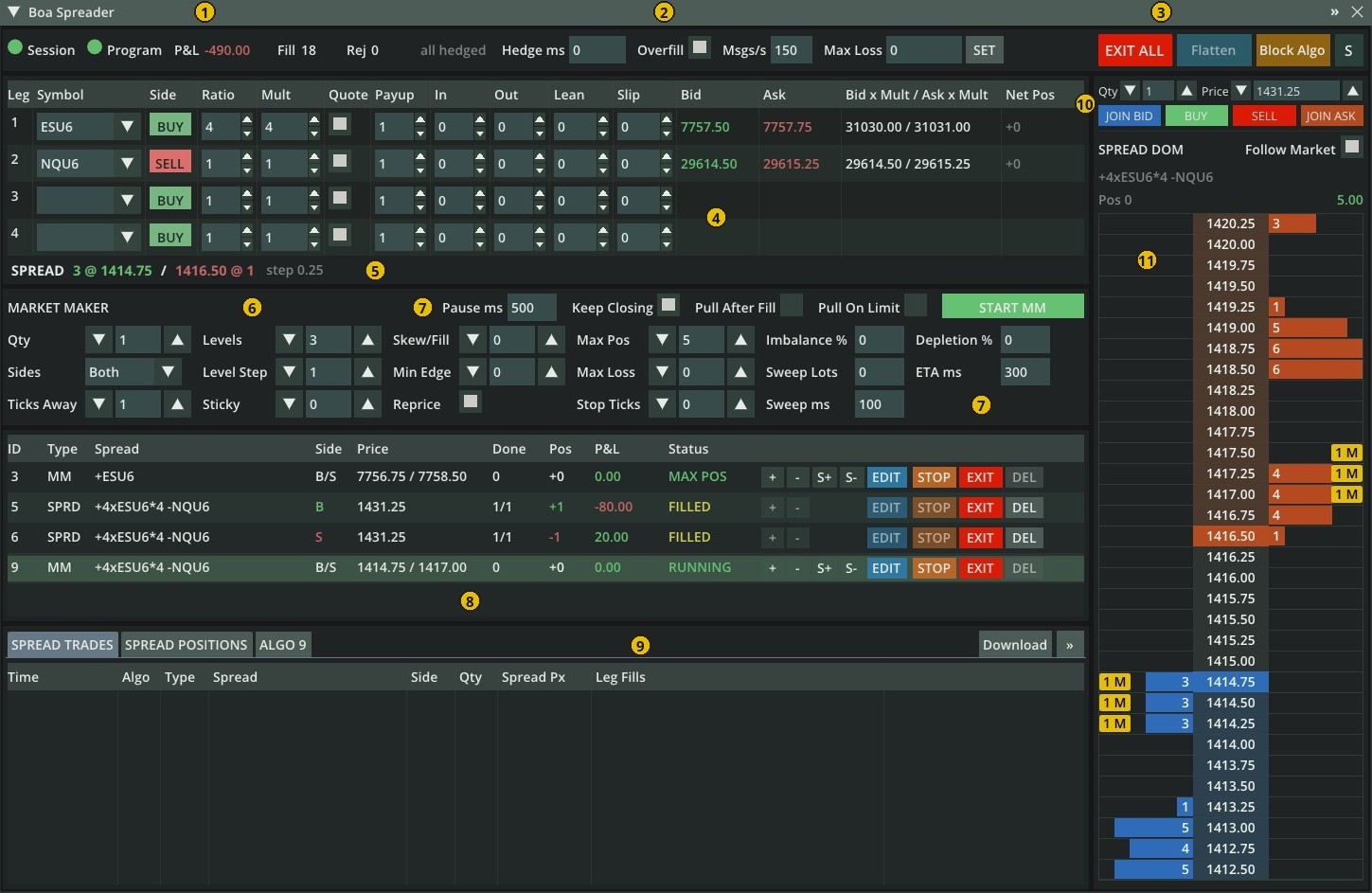
| Feature | What it does |
|---|---|
| Spread definition | 1-4 legs, ratio 1-100 and price multiplier 1-1,000,000,000 per leg, or the spread priced in dollars: calendars, inter-commodity spreads, butterflies, ES vs NQ. With one leg it is a single-instrument market maker. |
| Automatic hedging | A fill on any leg hedges the other legs to the same proportion at once: a limit order with your Payup that follows the market up to your Slip, then a market order after Hedge ms. Hedges above the clip size are split. |
| Spreader | Works a spread quantity at your target price. Quotes on the legs you choose, with inside / outside slop and lean on leg size; the first quoted leg to fill makes the others hedge legs. |
| Market maker | Quotes both sides around the implied market: up to 5 levels per side, a requote tolerance (Refresh), skew by position, min edge, max position, per-algo max loss and stop ticks. |
| Adverse-selection protection | Pulls quotes after a fill, in a wide market, when the exchange runs behind and when the request rate limit is reached. Orders that close the position can stay in. |
| Spread DOM | Implied depth up to 10 levels from the leg books, your orders and position on the ladder. Click to start a spreader, drag its badge to move it, hover for the leg prices behind any level. |
| Risk controls | Account and per-algo max loss, EXIT / EXIT ALL, Flatten, the account kill switch and a message rate limit per algo, on top of the platform's pre-trade risk checks. |
| Algos and records | Up to 32 algos at once on the same or different spreads, spread trade log and positions with realized and unrealized P&L, CSV export, a full order log. |
| Open source and protocol | The application source is in the package and the Boa Protocol is published: build your own spread application for the Boa Spreader window, or your own front end for the Boa Spreader application. |
Start in three steps: run the application with your leg symbols (Running the Application), open the Boa Spreader window in the Real-Time GUI, then set the legs and click BUY, SELL or START MARKET MAKER.
Note
Test every configuration on the simulator before trading live.
Concepts
| Term | Meaning |
|---|---|
| Spread price | The sum over the legs of sign x multiplier x leg price, where the sign is + for BUY legs and - for SELL legs. Ratio is only the quantity traded and never enters the price; the multiplier is only the price weight. With Price: $ each leg's multiplier is also multiplied by the contract's point value, so the price is in dollars. Set each leg's multiplier equal to its ratio and the spread price is the dollar value of one spread: a price change times the spreads traded is the P&L (a long spread whose price rises makes money). Example 4 ES : 1 NQ in dollars: ratio 4 / 1 and multiplier 4 / 1, price = 4 x $50 x ES - 1 x $20 x NQ. Example: +ESZ6 -NQZ6 with multipliers 1 and 1 is ES minus NQ. Legs with different price precision can be combined. |
| Ratio | Lots of a leg per spread (2:1 = 2 lots of leg 1 per lot of leg 2). Ratios do not enter the price. |
| One spread | ratio lots of every leg. All quantities and positions in Boa Spreader are in spreads. |
| Spread tick (step) | The greatest common divisor of multiplier x tick size over the legs (legs with ticks 0.25 and 0.10 and multiplier 1: 0.05). All market maker "ticks", DOM rows and +/- buttons use it. |
| Implied bid / ask | What the spread can be sold / bought at now: legs you would buy at their ask, legs you would sell at their bid. Implied size: the smallest leg size / ratio. |
| Quoted leg | Rests a passive order at the leg price that achieves the spread price with the other legs at their current market. Rounded to the leg tick in your favor, never at or through the leg's opposite side. With several quoted legs, all rest; the first to fill makes the others hedge legs. |
| Hedge leg | Sent only after another leg fills. |
| Hedging | A fill on any leg hedges the other legs to the same proportion, in whole lots, with a limit order at the market plus the leg's Payup. The hedge follows the market up to the leg's Slip; after Hedge ms the rest goes as a market order. Hedges above the clip size are split. Hedges win over quotes: a resting limit order of any Boa algo that the hedge would trade against is canceled and the hedge is sent right after it; while a hedge (or a market order) is live, no algo quotes into it. |
| Algo P&L | Realized plus unrealized at the leg bid/ask, in account currency, from the algo's own fills. |
Running the Application
The application is in src/BoaSpreader of the package. Build it there (or make boaspreader) and start it as a
standalone program or as a plugin:
g++ -std=c++20 -O2 boaspreader.cpp -I nanocondaroot/include -L nanocondaroot/lib -lnanoconda -o boaspreader
./boaspreader -e XCME -s <symbol1>,<symbol2>,... -u <username> -p <password> -a <account> [-c cpu] [-L level]
nanoconda-cli -a pluginloader -i boaspreader.so -- plugin -e XCME -s <symbols> -u <username> -p <password> -a <account>
| Argument | Description |
|---|---|
-e |
Exchange. |
-s |
Comma-separated symbols, up to 32. Only these symbols can be used as legs. |
-u / -p |
Username / password. |
-a |
Trading account. |
-c |
CPU to pin to (optional). |
-L |
Log level of boaspreader.log (optional): critical, error, warn, info, debug (default) or trace. Routine order lines (NEW, REPLACE, CANCEL, ACK, REPLACED) are debug; fills, state changes, hedges and settings are info; risk rejects, exchange rejects, external cancels and other anomalies are warn. As a plugin, add it after --. |
The application logs to boaspreader.log (see Log).
Source Files
| File | Contents |
|---|---|
src/BoaSpreader/boaspreader.cpp |
The application: entry points (main, init_nanoconda_plugin, plugin_stop), the list of algos, spread positions and the spread trade log, requests from the window (start, control, trade log), the state sent to the window, account Max Loss. |
src/BoaSpreader/ncboaalgo.h |
One algo, spreader or market maker: settings check, quoting, hedging, protection, exit, and the algo row shown in the window; also the slot layout and the interface boaspreader.cpp implements for it. |
src/BoaSpreader/Makefile |
Builds boaspreader (native) and boaspreader.wasm (WebAssembly plugin). |
include/nanoconda_boa_protocol.h |
Messages between the application and the Boa Spreader window (Boa Protocol). |
src/algos/ |
Shared trading logic: orders (ordercore.h), application core (hostcore.h), market maker (marketmaker.h) and spread pricing and hedging (spreader.h). See Algo Framework: Files. |
The Boa Spreader Window
Log in to the GUI with a trader user and open the window from the window menu (=) with the Boa Spreader checkbox. It is available in every tab.
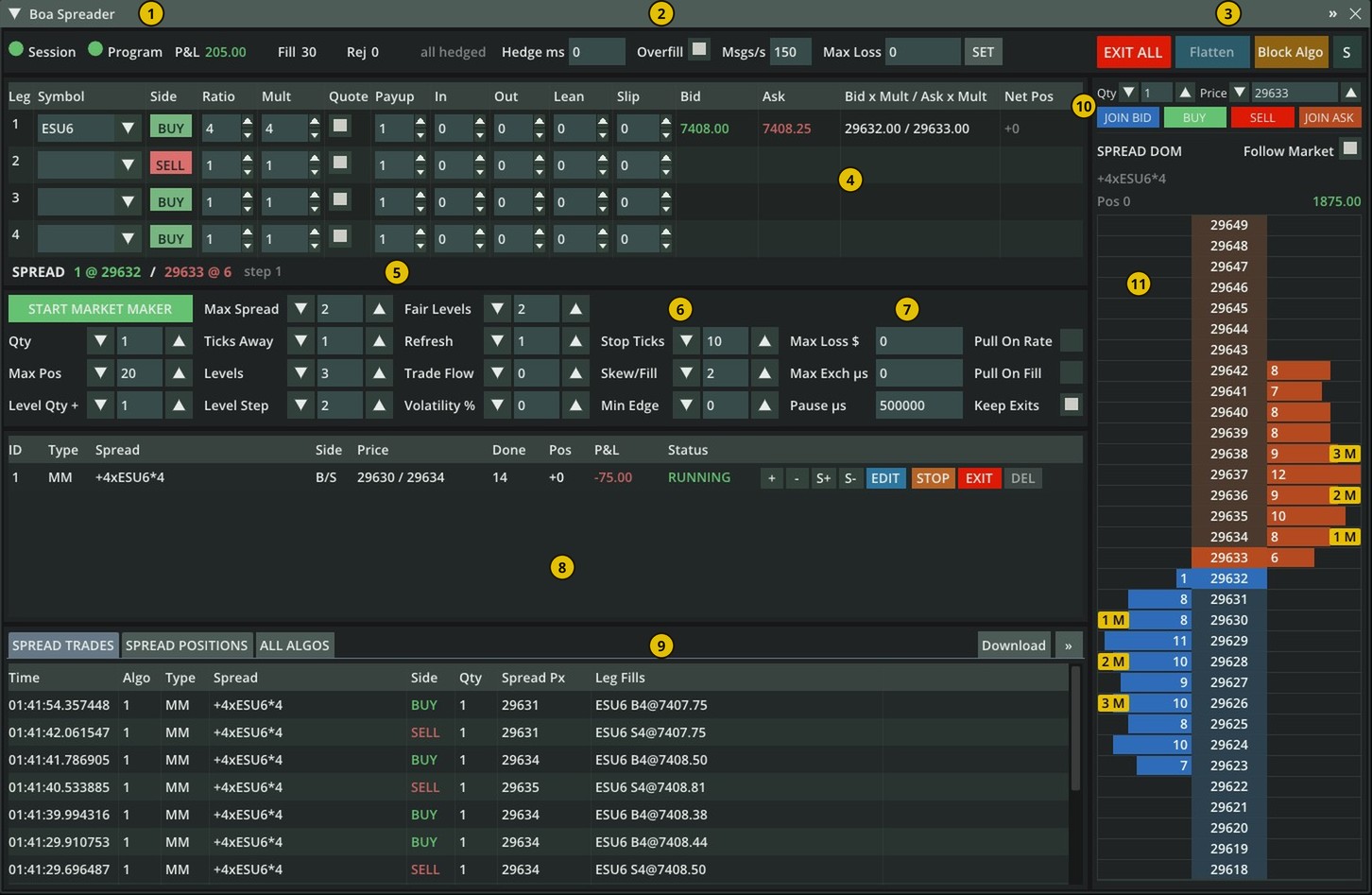
| # | Area | # | Area |
|---|---|---|---|
| 1 | Status | 7 | Adverse-selection protection |
| 2 | Execution settings | 8 | Algos |
| 3 | Emergency buttons | 9 | Spread trades and positions |
| 4 | Legs | 10 | Order entry |
| 5 | Spread line | 11 | Spread DOM |
| 6 | Market maker |
- Move the window by its title bar. » in the title bar opens it in its own browser window.
- Nothing is stored in the browser: inputs start at their defaults on every page load; algos, positions and trades come from the application.
1. Status
| Item | Meaning |
|---|---|
| Session | Green dot: the trading session is up. Red: it is down. |
| Program | Green dot: a program (algo application) is connected to the account. Red: no program is connected. Hover for Program Is Online / Program Is Offline. Whether that program is a working Boa Spreader application is shown by the bar described in When the Window Is Disabled. |
| P&L | Account session P&L. |
| Fill / Rej | Fills / refused orders (exchange and pre-trade risk) since the application started. |
| all hedged / UNHDG n age | n algos have legs being hedged; the oldest hedge is age seconds old. |
2. Execution Settings
Hedge ms, Overfill and Msgs/s apply to algos started afterwards. Numbers are typed in.
| Setting | Default | Range | Description |
|---|---|---|---|
| Hedge ms | 0 | 0-600000 | If a leg is still unhedged after this time, its limit hedge is canceled and the rest is sent as a market order. 0 = off. |
| Overfill | checked | checkbox | Spreader only. When a leg fills beyond the target: checked hedges the other legs to keep the ratio (more spreads than Qty may complete); unchecked hedges only up to the target and keeps the extra lots as a leg position. |
| Msgs/s | 150 | 0-1024 | Order messages per second per algo; quotes may use 80%, hedges and exits 100%. 0 = no algo limit. When the account's request limit is hit, the application sends nothing new for 1 second (cancels still go out). |
| Max Loss + SET | 0 | 0-100000000 | Account max loss in currency, 0 = off. When the session P&L reaches -Max Loss, the application runs EXIT ALL and refuses new algos until SET is pressed again; the label shows LOSS HIT. SET turns blue while an edited value is not applied. Resets to 0 when the application starts. |
Examples:
- Hedge ms 500: a leg fills and its hedge limit order is still not filled after 500 ms (for example because the market moved beyond the leg's Slip): the limit order is canceled and the remaining lots are sent as a market order.
- Overfill, spreader for 2 spreads on a 1:1 spread: the quoted leg fills 3 lots at once. Checked: the other leg is hedged with 3 lots and 3 spreads complete. Unchecked: the other leg is hedged with 2 lots, 2 spreads complete and the extra lot stays as an open leg position of the algo.
- Msgs/s 150: each algo sends at most 150 order messages (new, replace, cancel) per second; its quotes may use up to 120 of them, so hedges and exits always have room.
3. Emergency Buttons
| Button | What it does |
|---|---|
| EXIT ALL | EXIT on every algo: cancels their orders and closes their leg positions at market. Greyed out when there is nothing to exit. |
| Flatten | Closes all positions of the account, also those not opened by Boa Spreader. Boa Spreader positions are not updated by it; use EXIT ALL to close them. Greyed out when the account is flat. |
| Block Algo / Allow Algo | The account's algo kill switch: blocks all automated programs, Boa Spreader included, from sending new orders (asks for confirmation) / allows them again. |
| S | Screenshot of the window. |
Flatten and Block Algo are not shown to view-only users.
4. Legs
Up to 4 legs; empty rows are ignored. Numbers can be typed or stepped with ▲/▼ (hold to repeat). Price: Points | $ (switch on the SPREAD line under the legs, after the step, below the Mult column) chooses how the spread is priced; in $ mode the "Bid x Mult" column header reads "Bid / Ask x Mult x $/pt". Points: Mult x leg price. $: Mult x point value x leg price, so the price is in dollars; the SPREAD line and the SPREAD DOM title then show $. When a leg's Mult differs from its Ratio in $ mode, the SPREAD line warns that the price change times the spreads traded is not your P&L. Hover the selector for the rule.
| Column | Default | Range | Description |
|---|---|---|---|
| Symbol | Leg instrument, from the application's -s symbols; without the application, a search over all instruments of the GUI. |
||
| Side | BUY | BUY / SELL | Sign of the leg in the spread; click to toggle. |
| Ratio | 1 | 1-100 | Lots per spread. |
| Mult | 1 | 1-1,000,000,000 | Price multiplier (weight of the leg in the spread price); with Price: $ times the point value. Does not change the quantity traded. |
| Quote | on | on / off | Rest passive orders on this leg; off = hedge only. At least one leg must be quoted; a 1-leg spread is always quoted. |
| Payup | 1 | 0-100 | Hedge price in leg ticks beyond the market: buy hedge at ask + payup, sell hedge at bid - payup. |
| In | 0 | 0-100 | Spreader only. Inside slop: ticks a resting quote may be more aggressive than its ideal price before it is moved. |
| Out | 0 | 0-100 | Spreader only. Outside slop: ticks a resting quote may be less aggressive than its ideal price before it is moved. |
| Lean | 0 | 0-1000 | Spreads (lean x ratio lots) that must rest on this leg at its hedge price before other legs quote against it. 0 = off. |
| Slip | 0 | 0-1000 | Max leg ticks a hedge may move beyond the market at the start of hedging. 0 = no limit. |
| Bid / Ask | Leg best bid / ask. | ||
| Bid x Mult / Ask x Mult | Leg bid and ask times the multiplier (with Price: $: times multiplier x point value, the leg's dollar value in the price). |
||
| Net Pos | Net lots of the symbol held by the account (all trades, also those made outside Boa Spreader). |
Examples (leg tick 0.25, leg market 100.00 bid / 100.25 ask):
- Payup 1: a hedge that buys the leg is sent at 100.25 + 1 tick = 100.50; one that sells it at 100.00 - 1 tick = 99.75. Payup 0 hedges at the market price itself, which fills less reliably when the market moves.
- Slip 4: the hedge starts at 100.50 (Payup 1) and follows the ask up to 100.25 + 4 ticks = 101.25. If the ask goes higher, the hedge waits at 101.25 until it fills or Hedge ms sends the rest to market. Slip 0: no limit.
- Lean 5 on a hedge leg (ratio 1): the other legs quote only while this leg shows at least 5 lots at the price the hedge would trade (its ask when the hedge buys it, its bid when it sells it). When fewer lots are shown, the quotes are canceled, so a fill cannot leave you hedging into an empty book. The spread DOM shows "lean not met".
- Out 2 / In 1 (spreader): your resting buy quote is at 99.50. The ideal price rises to 100.00 (2 ticks more aggressive than your quote): it stays (Out 2); at 100.25 (3 ticks) it moves. The ideal price falls to 99.25 (your quote 1 tick too aggressive): it stays (In 1); at 99.00 it moves. Fewer moves keep queue position and save messages.
5. Spread Line
SPREAD step 0.25 Points (o) $ 3 @ 1414.75 / 1416.50 @ 1, left to right:
- SPREAD (SPREAD $ when the spread is priced in dollars) and the spread step.
- The Points | $ switch, under the Mult column: how the spread is priced (see Legs). Click it to change; hover it for the rule.
- Implied bid size @ implied bid / implied ask @ size, starting under the "Bid x Mult" column. The prices stay in place when the sizes change.
- In $ mode, a yellow note when a leg's Mult differs from its Ratio: the price change times the spreads traded is then not your P&L.
"waiting for leg quotes": a leg has no bid or ask. "select 1 to 4 different legs": the legs are not a valid spread.
6. Market Maker
Click START MARKET MAKER to start a market maker on the current legs with the settings of this panel. In this panel all "ticks" are spread ticks (the spread step) and all quantities are spreads, unless a setting says leg lots.
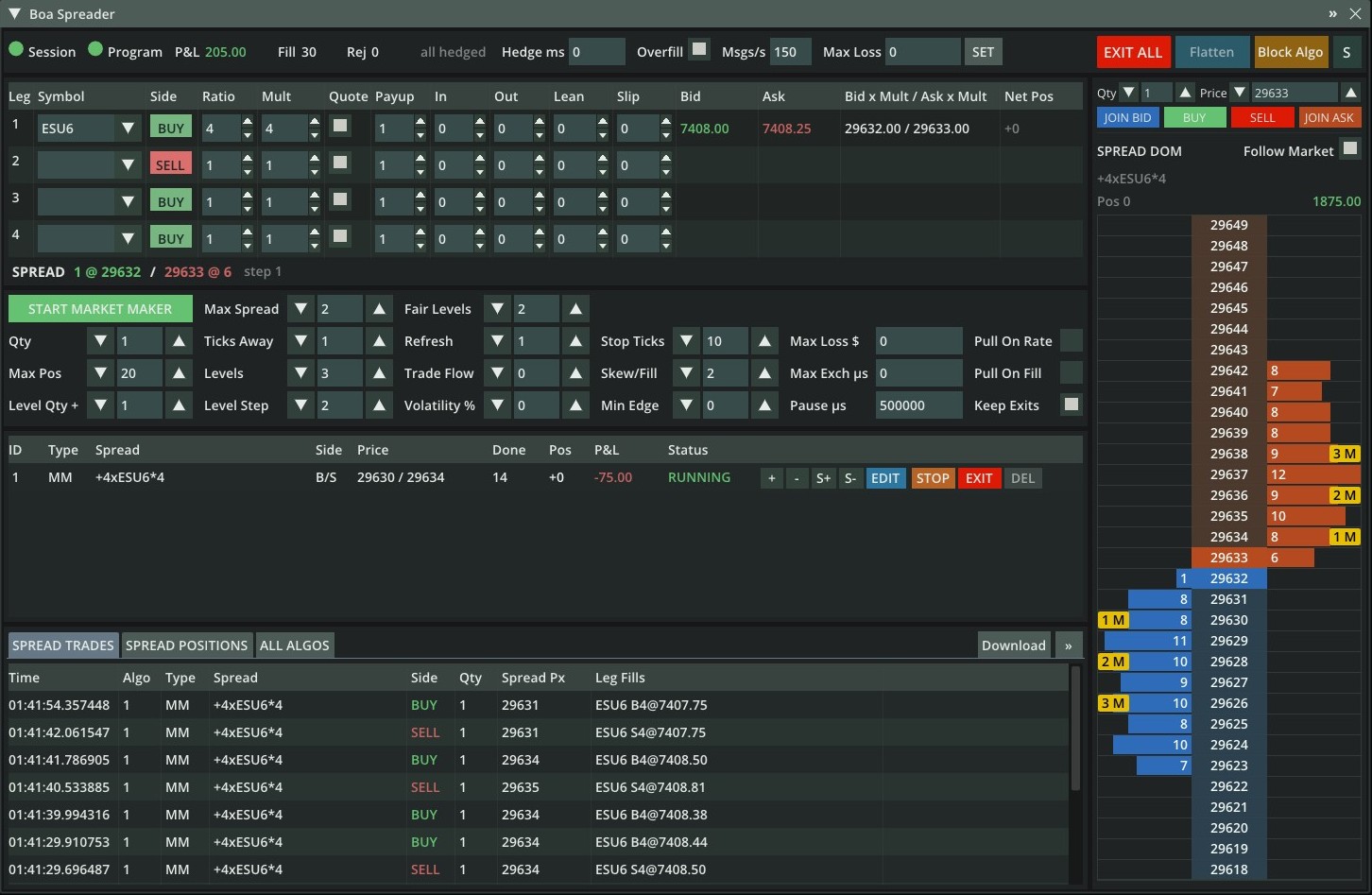
In the picture a market maker (algo 1) quotes the spread +4xESU6*4 (4 lots of ESU6, prices x 4) with 3 levels on
each side, 2 ticks apart and growing by 1 spread per level (Levels 3, Level Step 2, Level Qty + 1). The implied market
is 29632 / 29633; its quotes rest at 29630 / 29628 / 29626 and 29634 / 29636 / 29638 with 1, 2 and 3 spreads, the
1 M / 2 M / 3 M badges in the spread DOM. Its best quotes, 29630 / 29634, are in the Price column of its
algo row, and the account is flat on ESU6 (Pos 0).
Panel layout
| Row | Column 1 | Column 2 | Column 3 | Column 4 | Column 5 | Column 6 |
|---|---|---|---|---|---|---|
| Header | START MARKET MAKER | Max Spread | Fair Levels | |||
| 1 | Qty | Ticks Away | Refresh | Stop Ticks | Max Loss $ | Pull On Rate |
| 2 | Max Pos | Levels | Trade Flow | Skew/Fill | Max Exch µs | Pull On Fill |
| 3 | Level Qty + | Level Step | Volatility % | Min Edge | Pause µs | Keep Exits |
The columns follow the order you set things up in, from left to right:
- Header: the start button, the wide-market pull (Max Spread) and the fair value (Fair Levels).
- Column 1, size: quote size, position limit and the size added per deeper level (Level Qty +).
- Column 2, the ladder: the wide-market pull at the top, then the distance from the market, the number of levels and their spacing.
- Column 3, where the quotes sit: the fair value at the top, then how quotes follow small moves (Refresh), leaning on trade flow and widening on speed.
- Column 4, inventory: the price stop, how quotes change with your position, and the exit price limit.
- Column 5: the algo's loss limit, the exchange-delay pull and the pause time (typed numbers).
- Column 6: the on/off switches.
Each column holds one kind of input: ▼/▲ inputs in columns 1-4, typed numbers in column 5, checkboxes in column 6. The market maker always quotes both sides; to work one side only, use a spreader (BUY / SELL).
- Entering values: inputs with ▼/▲ step by 1 (hold to repeat); all inputs can be typed. A value outside its range is set to the nearest limit.
- Fixed at start: the settings are read when you click START MARKET MAKER. While the algo runs you can change Qty
(EDIT), Ticks Away (
+/-) and a manual skew (S+/S-) on its row in Algos. To change anything else, STOP the algo and start a new one. - 0 = off for every setting marked so below.
- Hover a protection setting or checkbox for a short description.
- Examples on this page use a spread step of 0.25, an implied market of 100.00 bid / 100.25 ask and Qty 1, unless they say otherwise.
All market maker settings
| Setting | Place | Default | Min | Max | Unit | 0 = off |
|---|---|---|---|---|---|---|
| Qty | column 1 | 1 | 1 | 10,000 | spreads | |
| Ticks Away | column 2 | 1 | 0 | 32,767 | spread ticks | 0 = join |
| Volatility % | column 3 | 0 | 0 | 1,000 | % of the spread ticks the mid moved in the last second | yes |
| Levels | column 2 | 1 | 1 | 5 | levels per side | |
| Level Step | column 2 | 1 | 1 | 100 | spread ticks | |
| Level Qty + | column 1 | 0 | -1,000 | 1,000 | spreads added per deeper level | yes |
| Refresh | column 3 | 0 | 0 | 100 | spread ticks | yes |
| Fair Levels | header, column 3 | 0 | 0 | 10 | book levels | 0 = mid price |
| Max Pos | column 1 | 5 | 1 (at least Qty) | 100,000 | spreads | |
| Max Loss $ | column 5 | 0 | 0 | 100,000,000 | account currency | yes |
| Stop Ticks | column 4 | 0 | 0 | 10,000 | spread ticks | yes |
| Skew/Fill | column 4 | 0 | 0 | 100 | spread ticks per Qty of position | yes |
| Min Edge | column 4 | 0 | 0 | 1,000 | spread ticks | yes |
| Keep Exits | column 6 | checked | checkbox | |||
| Pause µs | column 5 | 500,000 | 0 | 60,000,000 | microseconds | see text |
| Pull On Fill | column 6 | unchecked | checkbox | |||
| Max Exch µs | column 5 | 0 | 0 | 60,000,000 | microseconds | yes |
| Max Spread | header, column 2 | 0 | 0 | 1,000 | spread ticks | yes |
| Trade Flow | column 3 | 0 | 0 | 100 | spread ticks | yes |
| Pull On Rate | column 6 | unchecked | checkbox |
The window also checks two rules when you start: Max Pos must be at least Qty, and the largest level size (Qty, or the deepest level with Level Qty +) x ratio must fit the account clip size of every leg (otherwise BAD PARAMETERS or QTY ABOVE CLIP SIZE, see Errors).
Quoting
Qty
Default 1 · 1 to 10,000 spreads. The size of each quote level. Each leg order is Qty x the leg's ratio.
- Larger Qty: more size per fill, and Max Pos is reached in fewer fills.
- It can be changed while the algo runs with EDIT, up to Max Pos.
Example: Qty 2 on a 1:2 spread (leg A ratio 1, leg B ratio 2) quotes 2 lots on leg A, and a fill is hedged with 4 lots on leg B. With Max Pos 10, five fills on the same side reach the limit.
Ticks Away
Default 1 · 0 to 32,767 spread ticks. Distance of your best quotes from the implied market. In a one-tick market: buy at implied bid - Ticks Away, sell at implied ask + Ticks Away, and 0 joins the best implied price. Precisely, the quotes are Ticks Away plus half a tick from the fair value, so in a wider spread they sit inside it.
- Smaller: more fills, less edge per fill. Larger: fewer fills, more edge, less exposure to small moves.
+/-on the algo row change it by 1 while running.
| Ticks Away | Buy quote | Sell quote |
|---|---|---|
| 0 | 100.00 | 100.25 |
| 1 | 99.75 | 100.50 |
| 2 | 99.50 | 100.75 |
Volatility %
Default 0 (off) · 0 to 1,000 %. Widens your quotes when the market moves fast and brings them back when it calms down. The algo adds up how many spread ticks the implied mid price moved in the last second (a rolling window), and adds
extra ticks = ticks moved x Volatility % / 100, rounded down
to Ticks Away on both sides, so your market gets 2 x extra ticks wider.
- Widening is immediate: when the extra grows, both sides requote at once, also inside the Refresh band.
- Narrowing is gradual: when the moves leave the one-second window the extra drops and the quotes come back under the normal Refresh rule.
- Ticks Away stays the calm-market distance;
+/-change it, the extra comes on top. The algo row (and EDIT) shows the effective value. - It also applies to the Fair Levels offset, to all levels and to Min Edge's normal quoting (never beyond the limit).
Example, Ticks Away 1, Vol 50 %, implied market 100.00 / 100.25:
| Mid moved in the last second | Extra ticks | Effective Ticks Away | Quotes |
|---|---|---|---|
| 1 tick | 0 | 1 | 99.75 / 100.50 |
| 4 ticks | 2 | 3 | 99.25 / 101.00 |
| 20 ticks (data release) | 10 | 11 | 97.25 / 103.00 |
There is no cap: wider quotes simply fill less, which is the safe direction in a fast market. Start with 25-75 %.
Trade Flow
Default 0 (off) · 0 to 100 spread ticks. Leans the quotes toward the side aggressive traders are pushing. It looks at all market trades by aggressor side (not only your fills) in the last second:
- lean = (lots bought aggressively - lots sold aggressively) / lots traded, between -1 and +1; below 10 lots traded the lean is scaled down as if 10 lots had traded, so a few small trades move the quotes less.
- Both quotes move by Trade Flow x lean ticks: buying pressure moves them up (your offer away from the buyers), selling pressure down. With Fair Levels 1 or more the shift is added to the fair value.
- The side the flow pushes toward moves away at once, also inside the Refresh band; the other movements follow Refresh.
- For a spread, trades on the quoted legs count by their effect on the spread price: buyers on a
+leg or sellers on a-leg are buying pressure on the spread.
Example, Trade Flow 2, Ticks Away 1, implied market 100.00 / 100.25:
| Last second | Lean | Shift | Quotes |
|---|---|---|---|
| no trades | 0 | 0 | 99.75 / 100.50 |
| buyers 30, sellers 10 | +0.5 | +1 tick | 100.00 / 100.75 |
| buyers 80 | +1 | +2 ticks | 100.00 (one tick inside the market) / 101.00 |
| sellers 60 | -1 | -2 ticks | 99.25 / 100.25 |
| buyers 3 | +0.3 | +0.6, rounded to +1 tick | 100.00 / 100.75 |
Levels
Default 1 · 1 to 5 levels per side. Number of quotes per side, Level Step apart. A side quotes fewer levels when
Max Pos leaves no room for all of them: levels are added from the best price outward while their sizes still fit in
the room (with Level Qty + 0, that is min(Levels, room / Qty)).
Example: Levels 3, Level Step 1, Max Pos 5, flat: bids 100.00 / 99.75 / 99.50 and offers 100.25 / 100.50 / 100.75 (Ticks Away 0). Long 4: the buy side has room for 5 - 4 = 1 spread, so only the 100.00 bid remains; the sell side has room for 5 + 4 = 9, so all three offers stay.
Level Step
Default 1 · 1 to 100 spread ticks. Distance between levels. It has an effect only with Levels above 1.
Example: Levels 3 with Level Step 1 bids 100.00 / 99.75 / 99.50; with Level Step 4 it bids 100.00 / 99.00 / 98.00, and the deeper levels fill only on a real move, at a much better price.
Level Qty +
Default 0 (all levels Qty) · -1,000 to 1,000 spreads. Size added at each deeper level, like Hummingbot's
order_level_amount: level 1 (the best price) quotes Qty, level 2 Qty + Level Qty +, level N Qty + (N - 1) x Level Qty +.
Each leg order is that size x the leg's ratio. A negative value makes deeper levels smaller; a level that would be
below 1 spread is not quoted.
- Why: quote small at the best price, where fills are most often followed by an adverse move, and larger further out, where a fill comes from a bigger move and is often at a price that comes back.
- Max Pos limits the total: levels are added from the best price outward only while their total fits in the room Max Pos leaves, so a sweep through every level never takes you past Max Pos.
- Clip size: the largest level x ratio must fit the account clip size of every leg, or START is refused.
- EDIT of Qty keeps the step: the levels become the new Qty plus the same increments.
Example: Qty 1, Levels 3, Level Qty + 1: bids 1 / 2 / 3 spreads at 100.00 / 99.75 / 99.50, offers the same. With Max Pos 4 only the first two levels fit (1 + 2 = 3; adding 3 would make 6). Qty 3, Levels 4, Level Qty + -1: sizes 3 / 2 / 1, and the fourth level (0) is not quoted.
Refresh
Default 0 (off) · 0 to 100 spread ticks. A tolerance band around each quote's target price. A working quote stays where it is, keeping its queue position, while it is at most Refresh ticks away from the price it would be quoted at now, in either direction: behind the market or closer to it. When it is further away, it moves to the target.
- Both sides are treated the same, so in a small move your two quotes keep their distance and both keep their place in the queue. When the market comes back, they are still at the front.
- It saves cancel/replace messages when the market flickers by a tick.
- A quote is never held at or through the market: it must stay at least one tick inside the implied market.
- These always move the quotes at once, whatever Refresh is:
+/-(width) andS+/S-(manual skew) on the algo row, a fill while Skew/Fill or Min Edge is on, a widening from Volatility %, and a Trade Flow shift away from the pushing side. - It also applies to the closing quote under Min Edge, but never holds that quote beyond the Min Edge price (see Min Edge).
- A large value (for example 100) practically keeps working quotes where they are until the market comes to them.
- Typical values: 0 or 1. Larger values leave quotes away from the target for longer, and the side the market moves toward then sits closer to the market than Ticks Away.
Example, Ticks Away 2, Refresh 1, implied market 100.00 / 100.25, quotes 99.50 / 100.75:
| Implied market | Bid | Ask |
|---|---|---|
| 100.00 / 100.25 | 99.50 | 100.75 |
| up 1 tick: 100.25 / 100.50 | 99.50 (1 tick behind, held) | 100.75 (1 tick closer, held) |
| up 2 ticks: 100.50 / 100.75 | 100.00 (moved) | 101.25 (moved) |
With Refresh 0 both quotes follow every tick.
Fair Levels
Default 0 (mid price) · 0 to 10. The fair value the quotes are built from.
| Fair Levels | Fair value | Effect |
|---|---|---|
| 0 | mid price: (best bid + best ask) / 2, sizes ignored | symmetric quotes around the middle of the market |
| 1 | weighted mid of the top level (microprice): (ask x bid size + bid x ask size) / (bid size + ask size) | leans toward the side the price is likely to move to |
| 2-10 | the same, with the sizes of this many book levels on each side | less sensitive to changes in the top level alone |
Buy = fair value - (Ticks Away + half a tick), rounded down to a tick, and sell = fair value + (Ticks Away + half a
tick), rounded up; skew, Min Edge, the one-tick-inside rule and Refresh then apply as usual. With Fair Levels 0 and a
one-tick spread that is the best bid - Ticks Away and the best ask + Ticks Away. For a spread,
the fair value is the sum of sign x multiplier x each leg's fair value, over all legs.
Example, spread step 0.25, Ticks Away 0, Fair Levels 1:
| Book | Fair value | Buy | Sell | With Fair Levels 0 |
|---|---|---|---|---|
| 100.00 x 10 / 100.25 x 10 | 100.125 | 100.00 | 100.25 | 100.00 / 100.25 |
| 100.00 x 90 / 100.25 x 10 (heavy bid) | 100.225 | 100.00 | 100.50, leans back | 100.00 / 100.25 |
| 100.00 x 10 / 100.25 x 90 (heavy offer) | 100.025 | 99.75, leans back | 100.25 | 100.00 / 100.25 |
| 100.00 x 10 / 101.00 x 10 (wide spread) | 100.50 | 100.25 | 100.75, inside the spread | 100.25 / 100.75 (mid 100.50) |
- With equal sizes, 1 quotes the same as 0 (the microprice is then the mid).
- On large-tick futures the main effect of 1 or more is the lean: the side a lopsided book is about to run over steps back one tick. 0 ignores sizes and never leans.
- In a wide spread every setting quotes inside the spread, around the fair value; 0 stays symmetric around the mid.
Risk
Max Pos
Default 5 · 1 to 100,000 spreads, at least Qty. The largest spread position this algo may hold, long or short, including spreads still being hedged. It limits how many levels each side can quote: the buy side has room for Max Pos minus the position, the sell side for Max Pos plus the position. MAX POS shows in the algo's status when no side can quote. The account's pre-trade risk limits apply on top.
Example: Max Pos 3, Qty 1, Levels 3. Flat: three bids. Long 2: one bid. Long 3: no bids; the offers keep working, so the position can only go down.
Max Loss $
Default 0 (off) · 0 to 100,000,000 in account currency. When this algo's P&L (realized plus unrealized at the leg bid/ask) reaches -Max Loss $, the algo stops quoting, closes its position at market and ends with MAXLOSS. This is the limit of one algo; the account-wide Max Loss is in Execution Settings.
Example: Max Loss $ 500. At a P&L of -480 the algo keeps quoting; at -500 it exits and stops. It does not restart by itself.
Stop Ticks
Default 0 (off) · 0 to 10,000 spread ticks. A price stop on the position. Long: the algo exits when the implied bid falls to the average entry - Stop Ticks. Short: when the implied ask rises to the average entry + Stop Ticks. The position is closed at market and the algo ends with STOP LS.
Unlike Max Loss $, it triggers at the same price distance whatever the position size.
Example: long 2 at an average of 100.00, Stop Ticks 8. Implied bid 98.50 (6 ticks below): nothing happens. Implied bid 98.00 (8 ticks below): the algo exits.
Inventory
Skew/Fill
Default 0 (off) · 0 to 100 spread ticks per Qty of position. Moves both quotes against the position by
(position / Qty) x Skew/Fill ticks: lower when long, higher when short. The closing side becomes more aggressive and
the adding side less, so the position tends back to flat. The position counts in whole Qty units, and a quote never
crosses the implied market. S+ / S- on the algo row add a manual skew of one tick on top.
| Skew/Fill 1, Ticks Away 1 | Buy quote | Sell quote |
|---|---|---|
| Flat | 99.75 | 100.50 |
| Long 1 | 99.50 | 100.25 |
| Short 1 | 100.00 | 100.75 |
With Qty 5, positions of 1 to 4 cause no skew (less than one whole Qty); at 5 the quotes move one tick.
Min Edge
Default 0 (off) · 0 to 1,000 spread ticks. While you hold a position, the closing quote is never worse than the average entry plus (long) or minus (short) Min Edge ticks, so every round trip earns at least that edge. That price is a limit, not a fixed price:
- Short: the closing bid is never above average - Min Edge. Long: the closing offer is never below average + Min Edge.
- When the position fills, the closing side is requoted at once, so the limit applies straight away.
- On the other side of the limit it quotes like any quote: Ticks Away from the market, following it with Refresh. A large Refresh value (for example 100) practically keeps the exit where it is; Refresh 2 lets it follow the market once it is more than 2 ticks off.
Example: Ticks Away 3, Refresh 2, implied market 100.00 / 100.25. Your offer at 101.00 is hit: short 1 at 101.00. With Min Edge 2 the closing bid is never above 100.50.
| Implied market | Closing bid | Why |
|---|---|---|
| 100.00 / 100.25 | 99.25 | Ticks Away 3 below the bid, under the 100.50 limit |
| 99.75 / 100.00 | 99.25 | target 99.00, 1 tick off: held |
| 99.50 / 99.75 | 99.25 | target 98.75, 2 ticks off: held |
| 99.25 / 99.50 | 98.50 | target 98.50, 3 ticks off: moves |
| 101.50 / 101.75 (market against you) | 100.50 | target 100.75 is above the limit: the bid stays at 100.50 |
With Refresh 100 the bid would stay at 99.25 in the falling market, so the market comes to it.
The price of this guarantee is that a position can stay open while the market moves away; use it together with Stop Ticks or Max Loss $.
How It Quotes
- Buy top = implied bid - Ticks Away - skew; sell top = implied ask + Ticks Away - skew (skew includes
S+/S-; Ticks Away includes the Volatility % widening). With Fair Levels 1 or more, both are built from the fair value instead. - Min Edge is applied, then prices are kept at least one tick inside the implied market; then Refresh (on the closing side under Min Edge, never beyond the Min Edge price).
- Each side quotes
min(Levels, room / Qty)levels, Level Step apart. Room is Max Pos minus the position on the buy side and Max Pos plus the position on the sell side, minus spreads being hedged. MAX POS shows when no side can quote. - When prices move, orders already at a needed price are kept and as few orders as possible are moved.
- After a fill the filled side waits for the next market update before quoting again.
- A quote that cannot be moved within Msgs/s and is now better than the new top price is canceled and re-quoted after 2 seconds.
- Every fill is hedged with the leg and execution settings.
STOP cancels the quotes and finishes hedges, keeping the position; EXIT also closes the position.
7. Adverse-Selection Protection
Adverse selection is being filled just before the market moves against you. These settings cancel quotes when the market shows signs of that, and quote again when the signs are gone.
All times are in microseconds (µs): 1 ms = 1,000 µs, 1 s = 1,000,000 µs.
| Protection | Turned on by | Cancels | Quotes again |
|---|---|---|---|
| Pull On Fill | Pull On Fill checked | the filled spread side | after Pause µs without the implied price moving against the fill |
| Wide market | Max Spread above 0 | both sides | when the spread is within Max Spread again |
| Exchange delay | Max Exch µs above 0 | both sides | after Pause µs without a new delayed message on any leg |
| Request rate limit | Pull On Rate checked | both sides | after the 1-second request-limit pause |
How every protection behaves
- It cancels the side's quotes on every quoted leg; it never moves them.
- When it ends, the side is quoted again with new orders.
- Hedges are never canceled, and the position and the other side are not touched (exchange delay and Pull On Rate cancel both sides).
- While a side is out, the algo stays RUNNING and its quotes disappear from the spread DOM.
- A pause ends with the first book update of a quoted leg after it has passed. An update identical to the previous one counts only after 100 ms, so when the legs are quiet a pause can end up to about 100 ms later than set.
- With Keep Exits checked, orders that reduce the position can stay in while their side is out.
Pause µs
Default 500,000 (0.5 s) · 0 to 60,000,000 µs. How long a side stays out after Pull On Fill or an exchange delay. Pull On Rate always lasts 1 second.
- Shorter: you are back in the market sooner and lose less queue time, but may be filled again by the same move.
- Longer: safer after a move, but you miss more of the following flow.
- 0 makes Pull On Fill and Max Exch µs ineffective, even when they are turned on, because the side is out for no time.
Example: Pause 500 µs. A fill at time 0 cancels the bids (Pull On Fill). A book update at 300 µs: still out. The first book update after 500 µs (say at 600 µs): the bids are quoted again.
Pull On Fill
Default unchecked. After any leg of a spread side fills (fully or partly), all quotes of that side are canceled; hedging continues. The side stays out for Pause µs, and the pause starts again every time the implied price on that side moves further against the fill: a lower implied bid after you bought the spread, a higher implied ask after you sold it. So the side quotes again only once the market has stopped moving against you.
Example, Pause 2000 µs: you buy the spread at 100.00 and the bids are canceled. At 1500 µs the implied bid drops to 99.75: the pause starts again and now ends at 3500 µs. The market stops falling, and the bids return at the first book update after 3500 µs. Unchecked: the bids are re-quoted at once, and in a falling market they can be filled again at 99.75, 99.50 and so on.
Max Spread
Default 0 (off) · 0 to 1,000 spread ticks. Cancels both sides while the market spread (best ask - best bid) is wider than this many ticks, and quotes again on the first update where it is back within the limit. There is no pause, the position is kept, hedges continue, and with Keep Exits the exit orders stay.
A suddenly wide market (after a sweep, around a data release, in a thin market) is when quotes are most easily picked off and when closing a position is most expensive, so the algo steps out instead of flattening.
Example, Max Spread 2 on a product that normally trades 1 tick wide: a sweep empties the offer and the market widens to 4 ticks: all quotes are canceled. The book refills to 1 tick a moment later: the quotes are back.
Max Exch µs
Default 0 (off) · 0 to 60,000,000 µs. Every book update and trade of a leg carries the exchange's matching-engine time (transaction time) and the time it was published (exchange time). The difference shows how far the exchange is running behind. When it is above Max Exch µs on any leg of the spread, quoted or hedge-only, both spread sides are canceled for Pause µs, counted from that message; each new delayed message starts the pause again. Hedges keep working. Messages without a transaction time are ignored.
When the exchange runs behind, the book you see is late and your quotes are the easiest to pick off.
Example, Max Exch 500 µs, Pause 2000 µs: the exchange normally publishes about 100 µs after matching. An update on the hedge leg arrives 800 µs behind: all quotes are canceled. They return at the first book update more than 2 ms after the delayed one, unless another delayed message arrives first.
Watch the product's normal delay in quiet and busy periods and set Max Exch µs a few times above it.
Pull On Rate
Default unchecked. When the platform refuses an order or replace because the account's request rate limit is
reached (REQUEST_LIMIT), the application sends nothing new for 1 second; cancels still go out. With Pull On Rate
checked, every market maker cancels all its quotes for that second (the one whose request was refused at once, the
others at their next market update) and quotes again when it has passed. Hedges and exits are not canceled. The
algo's own Msgs/s pacing does not trigger it.
Example: you hit the rate limit during a fast move. Checked: all quotes are canceled at once and return 1 second later. Unchecked: the quotes stay at their old prices for that second and cannot be moved, so in a fast market they can be picked off.
Keep Exits
Default checked. Keeps the exit orders working when a protection cancels the spread side that closes the position (the sell side when long, the buy side when short). Each quoted leg keeps its orders on that side, best price first, while they fit within the spread position x the leg ratio; the first one that does not fit, and all behind it, are canceled. Nothing new is sent and no price is changed on that side until the protection ends. When flat, or unchecked, the side is canceled completely.
Example: long 2 spreads with three sell levels of 1 spread; Pull On Rate cancels the quotes. Checked: the 2 best sell levels stay and the third is canceled. Unchecked: all three are canceled and you hold the position without exit orders until the pause ends.
Starting Values
Starting points for CME futures traded from a colocated server, to be tuned with your own fills on the simulator before trading live. They are not recommendations.
| Setting | Fast products (e.g. ES, NQ, ZN) | Medium (e.g. CL, GC, 6E) | Slow or thin (deferred months, spreads with hedge legs) |
|---|---|---|---|
| Pause µs | 500-2,000 | 2,000-10,000 | 20,000-200,000 |
| Pull On Fill | checked | checked | checked |
| Volatility % | 25-75 | 25-75 | 0-25 |
| Max Exch µs | a few times the product's normal delay | same | same |
| Max Spread | 2-3 x the normal spread | same | same |
| Trade Flow | 1-2 | 1-2 | 0-1 |
Suggested order: size and risk first (Qty, Max Pos, Max Loss $, Stop Ticks), then quoting (Ticks Away, Levels, Fair Levels, Refresh), inventory (Skew/Fill, Min Edge, Keep Exits), and finally the protections one at a time, starting with Pull On Fill and Pause µs.
8. Algos
One row per algo; the list scrolls.
| Column | Description |
|---|---|
| ID | Algo number. Click the row to filter the spread trades to this algo. |
| Type | SPRD or MM. |
| Spread | Legs, e.g. +4xESU6*4 -NQU6 (4x = ratio, *4 = multiplier, shown when not 1). |
| Side | B, S or B/S. |
| Price | Spreader: target price. MM: top buy / top sell. Starts with $ when the algo's spread is priced in dollars. |
| Done | Spreader: spreads done / quantity (FILLED when complete). MM: spreads traded. |
| Pos / P&L | Spread position and P&L of the algo. Hover P&L for its markout. |
| Status | Detail below, or the state (RUNNING green; STOPPING, EXITING, DONE yellow). A red cell means a leg is unhedged; hover for leg, lots, age and MKT once sent to market. |
| Status detail | Meaning |
|---|---|
| UNHEDGED | A leg is being hedged. |
| NO MKT | A leg has no valid market; quoting paused. |
| MAX POS | MM cannot quote either side. |
| STOPPING | STOP in progress. |
| FILLED / STOPPED / CANCELED | Why the algo is DONE. |
| MAXLOSS / STOP LS / ACCT MAX LOSS / EXIT ALL / EXIT | Why the algo is exiting, and after it is DONE why it exited: its Max Loss $, its Stop Ticks, the account Max Loss, EXIT ALL, or EXIT on its row. |
| LATE FILL | A fill arrived after the algo finished; it is hedged and the algo finishes again. |
| STUCK ORD | An order has had no exchange response for 10 seconds. |
| BLOCKED / NO PERM / SESS DN | Algo kill switch on / no trading permission / session down. |
Markout
A markout shows how the market moved after the algo's fills. Hover the P&L of an algo row to see, for example, Markout 1s +0.4 / 10s -1.1 ticks (38 fills):
- For each fill, the GUI takes the spread mid (the middle of the implied bid and ask, as in the spread DOM) 1 second and 10 seconds after the fill and compares it with the fill price, in spread ticks. After a buy the markout is mid - fill price; after a sell it is fill price - mid.
- Positive (green): the market moved your way after your fills. Negative (red): it moved against you; your fills tend to come just before the price moves through them (adverse selection).
- The values are averages weighted by quantity. The number of fills counts those measured at 1 second; the 10 second value uses the fills that are at least 10 seconds old.
- Read the two horizons together. Negative at 1 s: faster traders pick off your quotes; look at Pull On Fill or Max Exch µs. Negative at 10 s: you are trading against the trend; look at Skew/Fill, Trade Flow or Volatility %. Compare the values before and after changing a setting.
Markouts are measured by the GUI while it is open, from the books of the legs it receives. Fills from before the page was opened, after a reload, or while a leg's book was not shown in the GUI are not measured; with none measured, the tooltip does not appear. A browser tab in the background can measure fewer fills, as browsers slow down hidden pages.
| Button | Spreader | Market maker |
|---|---|---|
+ / - |
Price up / down one spread tick. | Ticks Away +1 / -1; both sides are re-quoted at once, also while Refresh would hold them. |
S+ / S- |
Not shown. | Both quotes one tick higher / lower, at once, also while Refresh would hold them. |
| EDIT | Change price and quantity. | Change Qty; shows Ticks Away and skew. |
| STOP | Stop quoting, finish hedges, keep the position. | Same. |
| EXIT | Cancel quotes, close all leg positions at market (split by clip size); logged as an EXIT spread trade. Also for DONE algos with a position. | Same. |
| DEL | Remove a DONE algo without working orders. | Same. |
If one of an algo's orders is canceled from outside Boa Spreader (for example from Live Orders), the algo stops (STOPPING).
9. Spread Trades and Positions
SPREAD TRADES: one row per completed spread, newest first: time (UTC), algo, type, spread, side, quantity, spread price and each leg's side, lots and average price. EXIT closes are one row each.
- The third tab reads ALL ALGOS, or ALGO n while filtered: click an algo row to filter, click the tab to clear.
- Download saves the trades as CSV.
- » opens trades and positions in a separate, resizable browser window (the filter is shared).
SPREAD POSITIONS: one row per spread definition across all algos: Pos, Avg Px, Realized, Unrealized, Net, Spreads and Lots traded.
Both cover the current application run (last 32,768 spreads). When the application stops, the trade log stays visible until the next application sends data.
10. Order Entry
| Control | Description |
|---|---|
| Qty | Spreads to fill, 1-10000 (qty x ratio per leg must fit the clip size). Also used by DOM clicks. |
| Price | Target spread price; ▼/▲ = one spread tick. Set to the implied mid when the spread first has a market and whenever the legs change; afterwards only by you. |
| JOIN BID / JOIN ASK | Start a BUY spreader at the implied bid / a SELL spreader at the implied ask. |
| BUY / SELL | Start a BUY / SELL spreader at Price. |
The buttons are greyed out without a valid spread or application data; JOIN BID / JOIN ASK also without an implied market; BUY / SELL also until Price has been set for the current spread. A spreader finishes (DONE, FILLED) when Qty spreads are complete.
11. Spread DOM
A price ladder of the current spread, one row per spread tick. The title reads SPREAD DOM ($) when the spread is priced in dollars.
- Follow Market (on by default) keeps the market centered; scrolling turns it off; changing a leg turns it on.
- Under the header: spread name, the account's position in this spread (
Pos +5 @ 1252.95,Pos 0when flat) and the account's net P&L on its legs. These come from the account, like the regular DOM, so trades made outside Boa Spreader (Flatten, the regular DOM, other programs) are included. - Position: each leg's account position is divided by its ratio (with its side); the spread position is the
smallest of those, when all legs point the same way. Example,
+4xESU6*4 -NQU6with ESU6 +4 and NQU6 -1:Pos +1. - Not in spread: leg positions left over after whole spreads are shown in red next to it, for example
+4xESU6*4 -NQU6with ESU6 +4 and NQU6 -2:Pos +1 @ ... NQU6 -1 not in spread(another trade on the instrument, or a leg not hedged yet). The whole spreads keep their average price and position line. - Average price: sign x multiplier x each leg's account average price, added up. With leftover lots on a leg it uses that leg's average over all its lots, because the account does not tell which lots belong to the spread.
- P&L: realized plus open P&L of the account on the spread's legs (open P&L at the bid for a long, the ask for a short, as in the regular DOM). If a leg is also traded outside this spread, its P&L is included.
- Boa Spreader's own record per spread stays in SPREAD POSITIONS.
| Element | Meaning |
|---|---|
| Blue bars (left) / orange bars (right) | Implied depth, bid / ask, with the size in spreads. |
| Solid blue / orange price | Best implied bid / ask. |
| Gold badges | Every working order of the account on the spread's legs (Boa Spreader's, manual, other programs'), with its remaining quantity in spreads (leg lots / ratio, rounded up); M marks market maker orders. A leg order is shown at the spread price it stands at now: its price (stop orders: trigger price) combined with the other legs' current prices on the side a hedge would take. A buy order on a + leg is a spread buy, on a - leg a spread sell. An algo quoting several legs rests the same spread on each of them; only its quotes on the first of those legs are shown, so one spread counts once. Market orders and orders not yet acknowledged are not shown. |
Gold ▲ n / ▼ n in the top / bottom row |
Working orders above / below the visible ladder on that side, with their total remaining quantity in spreads. Scroll to see them. |
Green / red line with +n / -n |
Open position at its average entry price (an arrow at the edge when off screen). |
Depth (up to 10 levels per side) is built from the leg books: each level is the number of spreads tradable at that spread price by trading all legs together, using up leg size level by level. It thins out when any leg's book is thin.
Hover a level for what-if prices: each quoted leg's price, each hedge leg's side and market, and "lean not met" when a lean would stop the quote.
| Where | Click | Drag |
|---|---|---|
| Left / right, empty level | Start a BUY / SELL spreader at that price with Qty. | |
| Your spreader's badge | Stop that spreader. | Drag to another level: move the spreader there. |
| Price column | Copy the price into Price. |
Click and drag act on a spreader's own resting orders (its quotes). Market maker orders, a spreader's hedge orders
(priced to trade at once) and orders not placed by Boa Spreader are display only. M marks every order of a market
maker: its quotes, hedges and exits.
When the Window Is Disabled
Trading from the window needs the Boa Spreader application: it runs the spreaders and market makers and does the hedging. When the application cannot be used, a bar appears between the legs and the market maker panel and the parts that need it are greyed out: the market maker panel, the algo list, the order entry above the spread DOM and the application settings. Clicking and dragging in the spread DOM then do nothing.
Without the application you can still use:
- Legs: pick legs, ratios and multipliers and see their books. The Symbol list then shows all instruments of the GUI in alphabetical order (the first 200); type the start or end of a symbol to narrow it. With the application connected, the list shows the instruments of the application, because algos can only start on those.
- Spread DOM: implied depth, what-if prices, and the account's position, P&L and working orders on the legs.
- Spread trades and positions already downloaded, and Flatten, Block Algo / Allow Algo and S.
| Bar | When | Clears |
|---|---|---|
| Grey: Trading needs an application implementing the Boa Spreader protocol... | No Boa Spreader application is connected to the account. | When one connects and sends data. |
| Amber: Boa Spreader application not responding... | No data from the application for 4 seconds (last data stays on screen). | When data arrives again. |
| Red: Older Boa Spreader application on the server: protocol vX, this window vY... | A running Boa Spreader application uses an older protocol version than this window. Controls are disabled. | Update the server application. If that application stops, the grey bar returns after 4 seconds. |
| Red: Newer Boa Spreader application on the server: protocol vX, this window vY... | A running Boa Spreader application uses a newer protocol version than this window. Controls are disabled. | Update the GUI. If that application stops, the grey bar returns after 4 seconds. |
Errors
| Message | Cause |
|---|---|
| BAD SPREAD DEFINITION | No leg, a repeated symbol, a leg with contract multiplier 0 (no P&L, so no loss limits), ratio or multiplier below 1, multipliers so large that spread prices could overflow, or no quoted leg. |
| SYMBOL NOT TRADED BY THE APP | Symbol not in the application's -s list. |
| BAD PARAMETERS | A value out of range, or the action does not apply to the algo or its state. |
| QTY ABOVE CLIP SIZE | qty x ratio above the account clip size for a leg. |
| ACCOUNT MAX LOSS REACHED | Account Max Loss hit; SET a limit (or 0) to allow new algos. |
| NO FREE ALGO SLOT | 32 algos, or 16 spread definitions with positions. Remove finished algos. |
| ALGO NOT FOUND / ALGO ACTIVE | The algo was removed / cannot be removed or exited in its state. |
| TRADING SESSION DOWN | Session not up, algos blocked, or the application is starting. |
| PROTOCOL VERSION MISMATCH | Application and GUI use different protocol versions. |
Typical Use
| Task | How |
|---|---|
| Buy / sell a spread at a price | Set the legs, Qty and Price; click BUY / SELL, or click the left / right side of the DOM at that price. |
| Join the market | JOIN BID / JOIN ASK. |
| Move a working spreader | Drag its DOM badge, +/- in its row, or EDIT. |
| Make a market | Set the legs and market maker settings, click START MARKET MAKER; adjust with +/- (width) and S+/S- (skew). |
| Get flat | EXIT on the algo row; EXIT ALL for every algo. |
| Stop all automated trading | Block Algo. |
| Close every account position | Flatten (includes positions from outside Boa Spreader). |
Restart
Every application start is fresh: no algos, positions or trades are kept, and algo numbers start at 1. Orders not sent by the running application (previous runs, other programs, manual orders) are never touched and do not affect algo positions; cancel them from the GUI. Use EXIT ALL before stopping the application. Several Boa Spreader applications can run on one account; each manages only its own orders.
Log
boaspreader.log records every order sent, replaced and canceled, every ack, reject and fill, and every spread trade.
Lines of an algo start with #<id>.
| Tag | Event |
|---|---|
START / LEG / MM |
Algo settings at start (the second MM line lists the protection settings). |
STATE / INFO |
State and status-detail changes. |
NEW / REPLACE / CANCEL / ACK / REPLACED / CANCELED |
Order events. |
FILL / PARTIAL / SPREAD / EXIT |
Fills, completed spreads, exits. |
HEDGE / HEDGED |
A leg becomes unhedged (also hedge held at max slip) / hedged again. CANCEL ... in the way of a hedge = an algo's order canceled for another algo's (or its own) hedge. |
RISK / REJECT |
Refused by pre-trade risk (including REQUEST_LIMIT) / by the exchange. |
REQUEST ... refused |
Refused GUI request and the reason. |
MAXLOSS, STOPLOSS, PACE, ADJUST |
Max loss / stop exits, paced re-quotes, button changes. |
DUP ..., GAP FILL, LATE FILL, UNMATCHED, STUCK |
Duplicate, missed, late or unknown exchange responses; orders without a response. |
TRADING, SESSION, MARKET, CLIP |
Session, market data and clip size changes. |
BOOK |
All 16 spread definitions are in use; a flat, unused one is replaced. |
SHUTDOWN |
The application is stopping and cancels its orders. |
Limits
| Item | Limit |
|---|---|
| Legs per spread | 4 |
| Symbols per application | 32 |
| Algos | 32 at a time |
| Spread definitions with positions | 16 (flat, unused ones are reused) |
| Market maker levels | 5 per side |
| Spread quantity per algo | 10,000 in the window, 100,000 in the application |
| Spread trades kept | 32,768 |