
Boa Spreader: Your Own CME Spreads, Colocated, Customizable

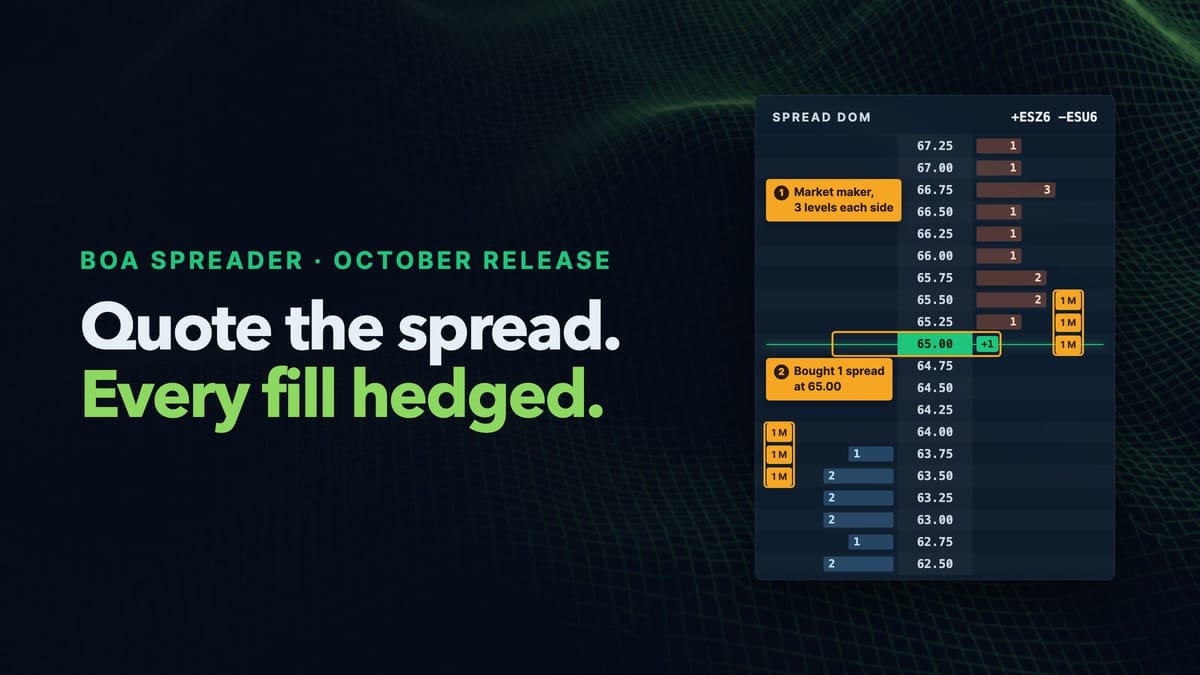
The October release adds Boa Spreader to the platform: an application that trades and makes markets in a spread you define yourself, from one to four CME futures legs, and hedges every fill as it happens. It runs on the server next to your trading session, you drive it from a window in the Real-Time GUI, and its source code ships in the package.
This post covers what it's for, the handful of parameters that define a spread, two worked examples, and how to make it your own.
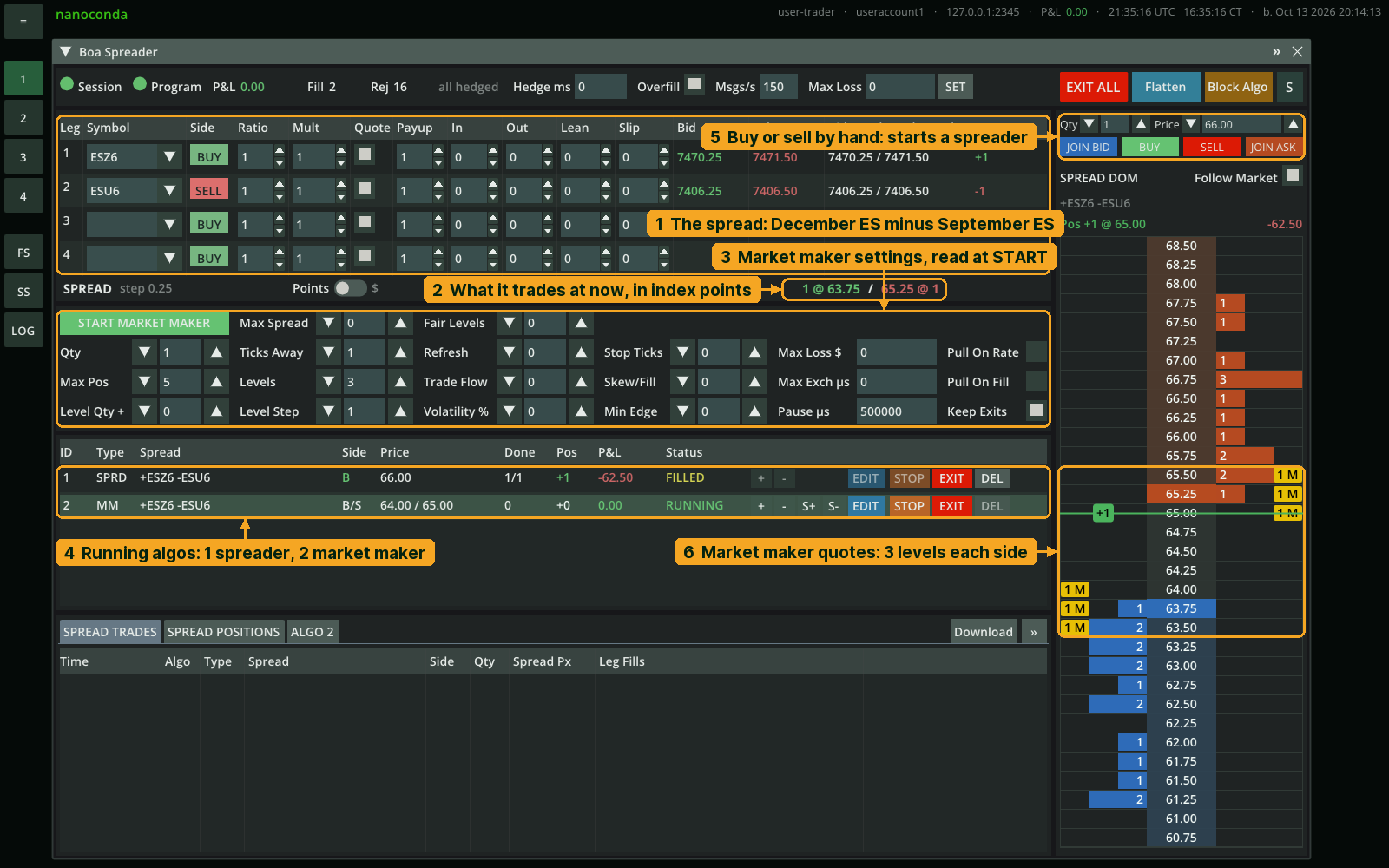
The screenshots in this post are from the Simulator. In production, the same application runs on a colocated server next to your trading session, and the GUI looks the same.
What it's for
A spread combines two or more contract positions and trades their relationship as a single idea. A typical two-leg spread is long one contract and short another. This can reduce exposure to price movements shared by both legs, leaving the change in their relative value as the main source of profit or loss.
Boa Spreader lets you define such a combination yourself, see its implied market on a ladder, work the passive legs, and hedge every fill from the colocated application. You define each leg: symbol, side, ratio, multiplier, and whether it quotes or only hedges. When a quoted leg fills, Boa immediately submits limit orders for the required hedge legs, starting at the current market plus Payup. The hedge follows the market up to Slip, and after Hedge ms any unfilled quantity is sent as a market order. With Hedge ms set to 0, the hedge stays a limit order and is never replaced by a market order. Here, immediately describes when the hedge is submitted, not when it fills; execution still depends on liquidity and market movement.
Why this matters: CME lists some spreads with their own order books, such as the calendar spread between two delivery months of the same product. Custom combinations and ratios, such as ES against NQ or two points on the yield curve, have no book of their own and are traded leg by leg: rest an order on one or more legs, then hedge the others after a fill. Traders may also choose this approach when a listed spread’s book is too thin. The risk is the time between the first fill and the completed hedge, and that is the part Boa Spreader takes over.
Two ways to run it:
- Spreader. Use it to buy or sell a set number of spreads at a price you choose. You pick which legs wait in the order book as a limit order (a resting order) and which legs trade only when needed. When a waiting leg fills, the spreader immediately submits the required hedge orders to complete the spread. It stops when the quantity is done.
- Market maker. The same spread, quoted on both sides at once: it buys a little below the implied price and sells a little above, up to five levels per side. It runs until you stop it. Every fill is hedged as in the spreader, and your position stays inside the limits you set.
On top of the platform's pre-trade risk checks, the application has its own: account and per-algo max loss, a message rate limit per algo, EXIT and EXIT ALL, Flatten, and the account's algo kill switch. Up to 32 algos can run at once on the same or different spreads.
Boa Spreader is a reference implementation of common trading tools; try any configuration of parameters or rewrite the source code in the Simulator before it trades live.
Core parameters to understand
Boa Spreader is a program that runs next to your trading session, standalone or as a plugin, in production or in the Simulator (the docs' Running the Application has the commands). The Boa Spreader window in the GUI connects to it: everything you set is in that window, and most of it is these six ideas.
Legs. Up to four, chosen from the symbols the application was started with. A custom spread has no order book of its own, so its price comes from the legs' books: the spread line reads 1 @ 64.00 / 65.00 @ 1, which means that right now one spread can be sold at 64.00 and one bought at 65.00.
Quote. A tick box per leg: does this leg wait in the book with a resting order, or is it only traded to complete a spread once another leg fills? A quoted leg rests passively in the order book and may wait for a fill. A hedge-only leg does not rest in advance: Boa submits it against the current market after another leg fills. Payup, Slip, and Hedge ms determine how aggressively that hedge is worked.
Ratio. How many contracts of each leg make one spread. A 3:2 ratio means that each spread trades three contracts of one leg and two of the other. Boa executes the ratio you specify; it does not calculate or recommend a hedge ratio.
Mult. How much each leg contributes to the calculated spread price. It does not change the number of contracts traded. The spread line has a Points | $ switch: in Points the spread is Mult × price on each leg; in $ the GUI also multiplies by each contract's dollar value per point, $50 for ES and $20 for NQ. Set Mult equal to Ratio on every leg and switch to $, and the spread reads as the dollar value of one spread, so its movement matches the position's P&L before fees. If Mult and Ratio differ, the spread line warns you that it no longer does.
Payup, Slip, Hedge ms. These settings control how a hedge is worked after a leg fills. Boa immediately submits the hedge as a limit order at the current market plus Payup ticks. Payup makes the initial order more aggressive, but does not guarantee a fill.
If the market moves before the hedge completes, Boa follows it up to the configured Slip limit, measured from the market when hedging began. If the hedge remains incomplete after Hedge ms, Boa cancels the unfilled limit quantity and submits it as a market order.
Max Pos, Max Loss, Levels. The market maker's limits: the biggest position it may build, the loss at which it exits, and how many price levels it quotes on each side. The rest of the panel (where the quotes sit, how they lean, when they pull back) is in the docs' market maker settings; the protections are covered under customizing below.
Two examples
Two legs, same product: the ES calendar spread
December ES bought, September ES sold, Ratio 1:1, Mult 1:1. Both legs are in S&P 500 index points; every point is worth $50 on both, so the spread line is in points too, about 65. This is the main example in the screenshots above and below.
Trading it is a price and a side: buy one spread at 66.00 or better, and the spreader rests on the quoted legs, submits the hedge as soon as one fills, and reports the spread it got.
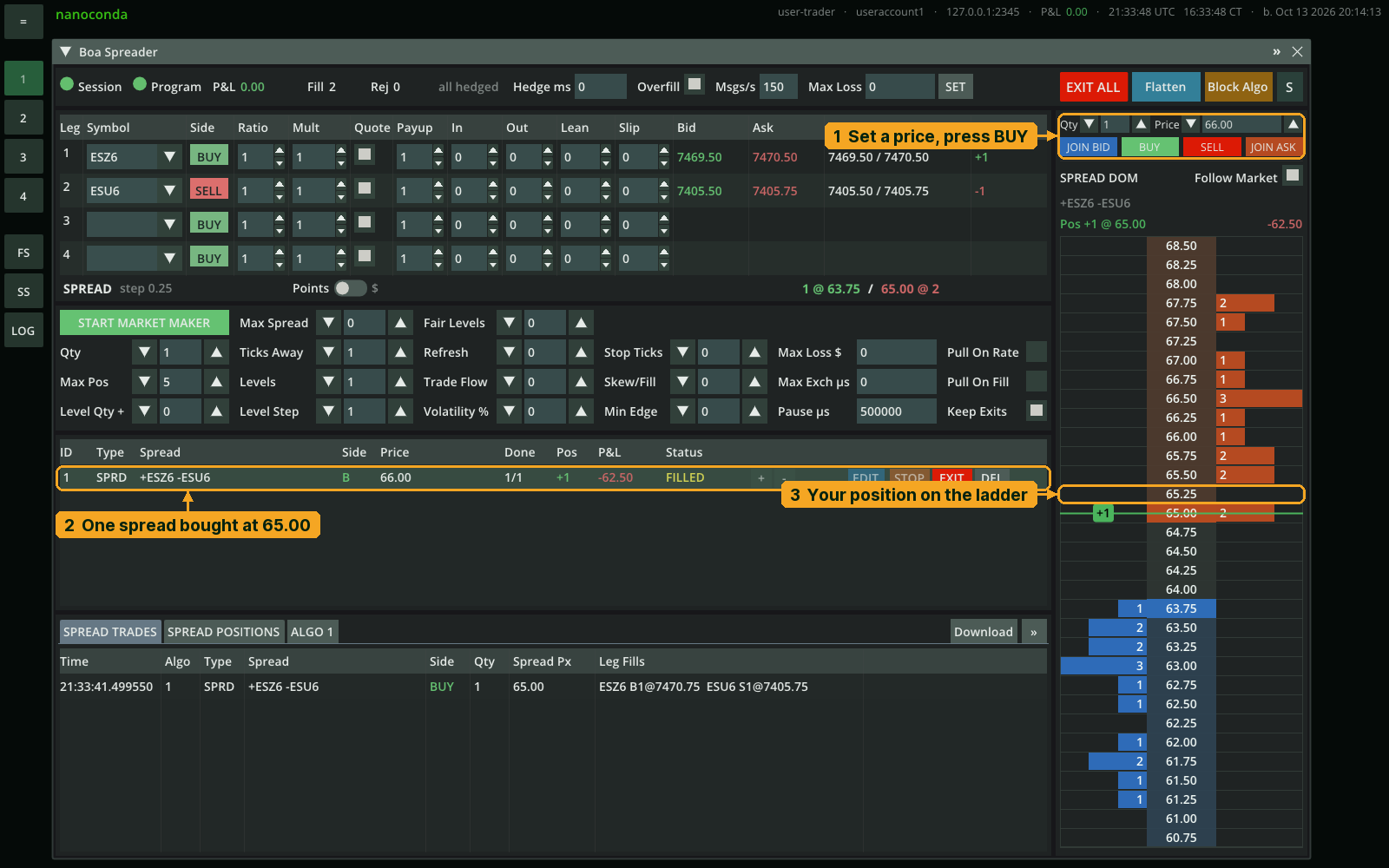
To make a market in the same spread, fill in the market maker panel and press START MARKET MAKER. It quotes a few levels on each side of the implied price, each one a resting order on a leg, and hedges every fill the way the spreader does.
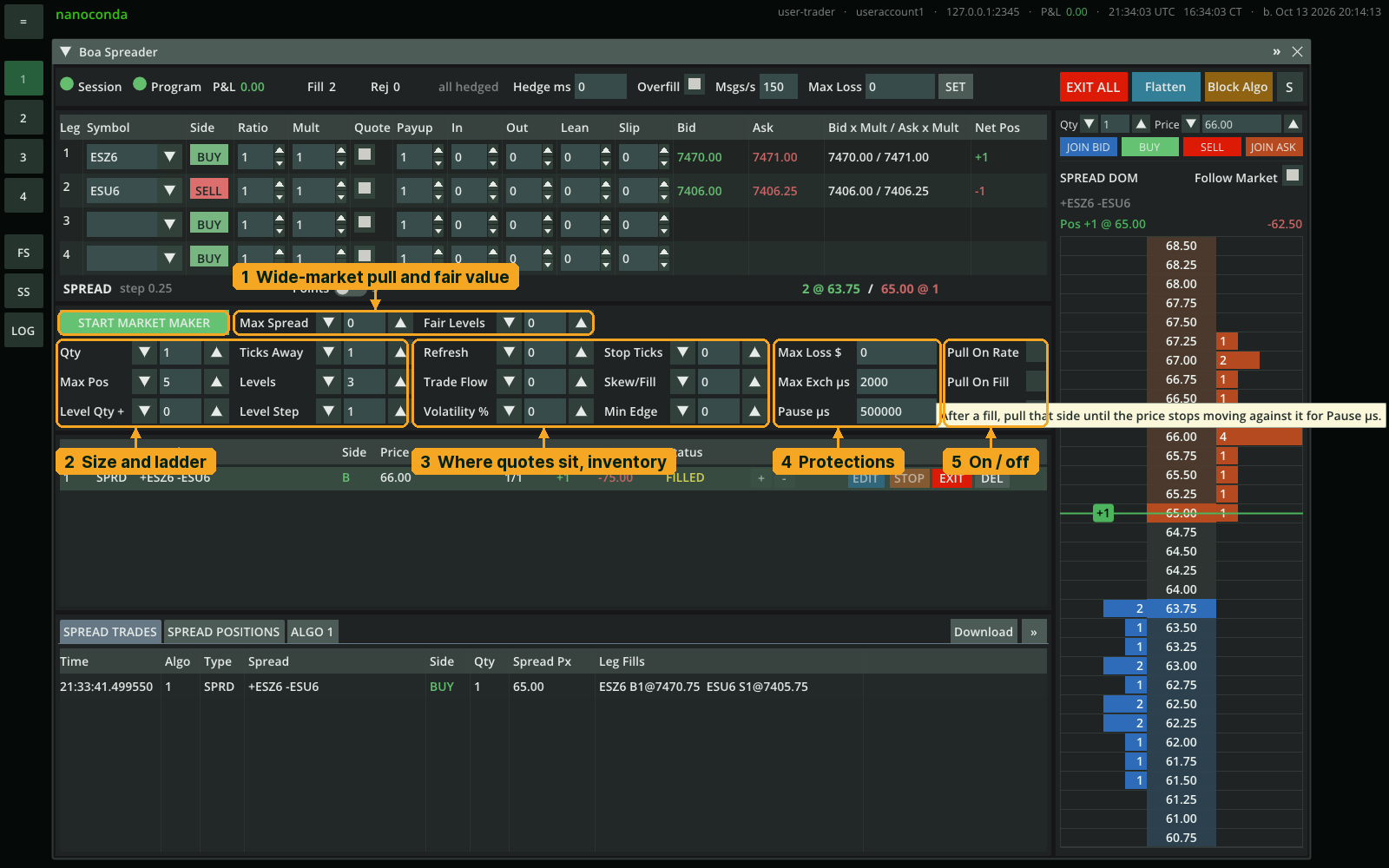
The position is kept per spread, not per contract: SPREAD POSITIONS shows how many spreads you hold, at what average price, and the realized and unrealized P&L.
Two legs, two products: ES against NQ
Here the legs are different products, so Ratio and Mult have separate jobs. Ratio determines how many contracts are traded; Mult determines how each leg contributes to the calculated spread price. One ES point is worth $50, and one NQ point $20, so "ES points minus NQ points" is not money. Select $ on the spread line and leave Mult at 1 for both legs. Boa applies ES's $50-per-point and NQ's $20-per-point contract values automatically. The displayed spread movement then matches the P&L of one long ES contract against one short NQ contract, before fees. That matches the configured 1:1 position; it does not mean the position is balanced or market-neutral.
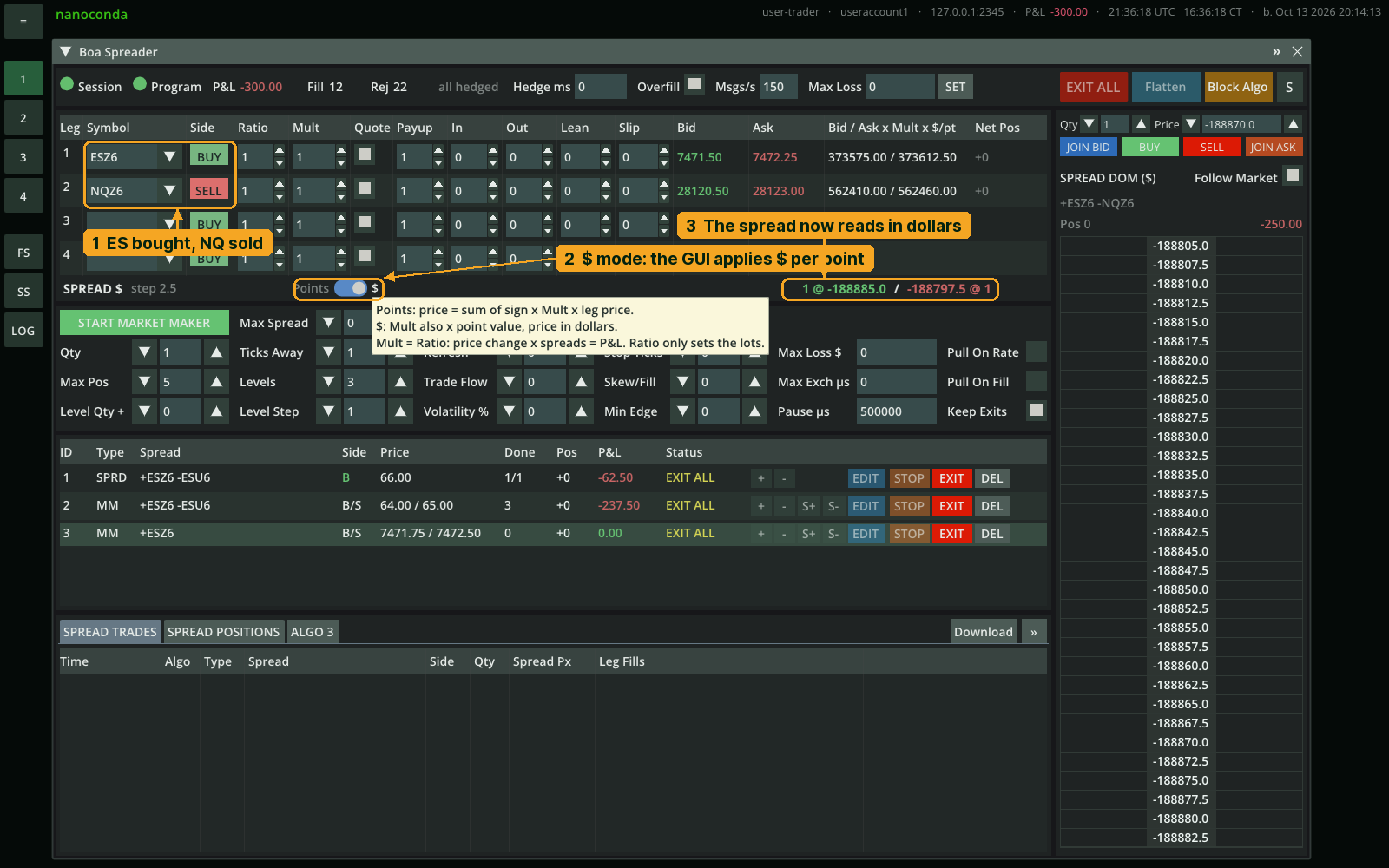
In Points, the spread is simply "ES points minus NQ points." Someone trying to make the two quoted index levels comparable might multiply ES by 4 because NQ trades at roughly four times the numerical price. But that balances the displayed prices, not the contracts' dollar exposure. Mult changes the calculated spread value; it does not change the contracts traded or their P&L.
| ES +20 pts, NQ +60 pts | Spread change | Your P&L (1 ES long, 1 NQ short) |
|---|---|---|
| Points, Mult 1 / 1 | 20 − 60 = −40 | −$200 |
| Points, Mult 4 / 1 | 80 − 60 = +20 | −$200 |
| $, Mult 1 / 1 | 1,000 − 1,200 = −200 | −$200 |
With Mult 4 / 1 the spread goes up 20 points, yet the position loses $200. In $ mode, the spread moves by −200, the same as the position’s P&L before fees. You’d get that number in Points mode too, by setting Mult to 50 and 20; the $ switch fills in those point values for you.
One leg works too
You can fill in one row only and start a market maker. With a single leg there is nothing to hedge, so the application just quotes that contract on both sides, three levels each, under the same limits and protections. It is a simple way to try the quoting settings before adding a second leg.
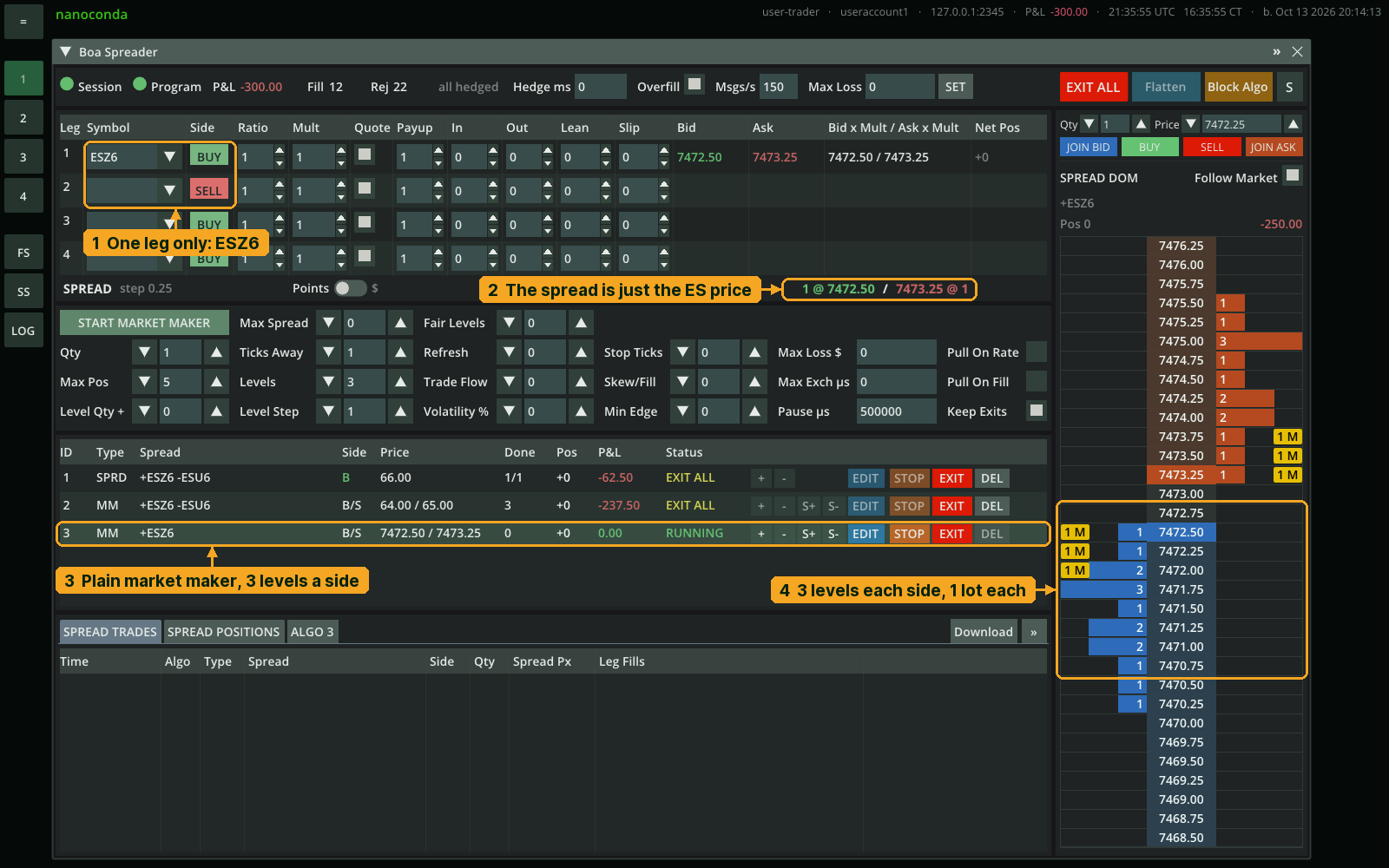
Three or four legs work the same way: a butterfly across three months, or a pair hedged with a third contract, each leg with its own side, ratio and quote flag. The spread line, ladder, and hedging don't change.
Controls and ways out
The Spread DOM is an order book for your spread, built from the leg books; your spreader appears on it as a badge you can drag to another price or click to stop. Every algo is a row in one table, with its own EDIT, STOP, EXIT and DEL, and a status that turns red the moment a leg is unhedged. The docs describe each part of the window: Spread DOM, Algos, Spread Trades and Positions.
STOP cancels an algo's quotes and finishes its hedges, keeping the position. EXIT closes the position at market as well. EXIT ALL does that for every algo. Flatten closes every position on the account, including ones Boa Spreader didn't open. Boa Spreader's own position records are not updated by Flatten; use EXIT ALL to close the positions it tracks. Block Algo stops every automated program on the account from sending new orders. A restart of the application starts clean, so exit before stopping it.
How to customize it
There are three levels, and you can stop at any of them.
Settings. Most of what people want to change is already a field in the market maker panel. Two groups are worth knowing before the rest:
- Where the quotes sit. Fair Levels builds the quotes around the mid price or a size-weighted mid (the microprice), Trade Flow leans them toward the side aggressive traders are pushing, and Volatility % widens them when the market moves fast and brings them back when it calms down.
- Adverse-selection protection. These cancel quotes when the market shows signs that the next fill would be a bad one, and quote again when the signs are gone: Pull On Fill (the filled side steps back for Pause µs), Max Spread (both sides out while the market is wider than this), Max Exch µs (both sides out while the exchange's own messages run late, then Pause µs again), and Pull On Rate (both sides out for one second when the request limit is reached). Keep Exits leaves the orders that reduce your position in the book while a protection is active, so protecting the quote never strands you in a position.
The remaining fields, the ladder shape (Ticks Away, Levels, Level Step, Level Qty +, Refresh), the inventory controls (Skew/Fill, Min Edge, Stop Ticks) and the spreader's per-leg In, Out and Lean, are each defined in the docs: market maker settings, protections, legs. All of them are also fields in the start request if you drive the application from your own code.
Source. The application ships as source. ncboaalgo.h is one algo: settings check, quoting, hedging, protection, exit. boaspreader.cpp is the program around it: the list of algos, positions, the trade log, and the requests from the window. The trading logic underneath lives in src/algos/: ordercore.h for orders and fills, hostcore.h for the session and market data, marketmaker.h and spreader.h for the quoting and hedging. The same four files power the Algo Framework and the market maker sample, so a change you make there carries across all three. The Makefile builds a native binary or a .wasm plugin.
Protocol. The application and the window talk over a small binary protocol, defined in one header, include/nanoconda_boa_protocol.h and published in the docs. Every message starts with a 32-byte header; the window sends start, control and trade-log requests, the application answers each one and publishes its state on every change, at most every 250 ms. It works in both directions. Write your own spread application, and the Boa Spreader window drives it unchanged. Or write your own front end, an office dashboard or a risk tool over the Remote API, and it drives the Boa Spreader application unchanged.
enum Type : unsigned int
{
	NCBOA_HEARTBEAT = 0,
	NCBOA_ALGO_START_REQUEST = 40,
	NCBOA_ALGO_CONTROL_REQUEST = 50,
	NCBOA_TRADE_LOG_REQUEST = 70,
	NCBOA_ALGO_START_RESPONSE = 140,
	NCBOA_ALGO_CONTROL_RESPONSE = 150,
	NCBOA_TRADE_LOG_RESPONSE = 170,
	NCBOA_STATE = 210
};

struct NcBoaHeader
{
	unsigned int magic;     // "NBOA"
	Type type;
	Status status;
	unsigned int requestId;
	unsigned int version;
	char reserved[12];      // 32 bytes in all
};
The eight message types and the 32-byte header every message starts with. The full header, with every request, response and state struct, is in the Boa Protocol docs.
So the choice is yours: use it as it is from the GUI on day one; tune the quoting and the protections; fork the algo; or treat the whole thing as a worked example of the platform's custom data channel and build something else on it. Same colocated servers, same pre-trade risk, same path to the exchange in every case.
Docs: Boa Spreader, Boa Protocol, Algo Framework, release notes. If you'd rather try it before anything else, the Simulator runs the same application against recorded market data, with no exchange connection and no capital at risk.